
Shopify Session Measurement Overhaul (2026): Why Sessions & Conversion Rate Shifted, Bot Filtering & Troubleshooting Guide
 Shopify Session Measurement Overhaul (2026): Why Sessions & Conversion Rate Shifted, Bot Filtering & Troubleshooting Guide
Executive Note: Explaining Recent Session and Conversion Rate Fluctuations in Shopify Admin
Between September 21 and 23, 2026, Shopify rolled out an update to how storefront Sessions are measured. Many merchants observed the following shifts in their analytics dashboards:
- Total storefront Sessions dropped by 15% to 30%.
- Reported Online store conversion rate rose accordingly.
- Cross-checking actual order counts, gross sales, and bank/payout settlements showed zero anomalies in underlying business performance.
In its official documentation ("Changes to sessions and conversion rate in Shopify Analytics"), Shopify explains that these metric shifts stem from updated session calculation rules and automated bot filtering—real shopper behavior and genuine storefront traffic have not changed. Below is a full breakdown of the three rule updates, the conversion rate formula, affected derived metrics, cross-period comparison guidelines, and headless troubleshooting steps.
Chapter 1: Three Core Changes to Shopify Session Measurement Rules
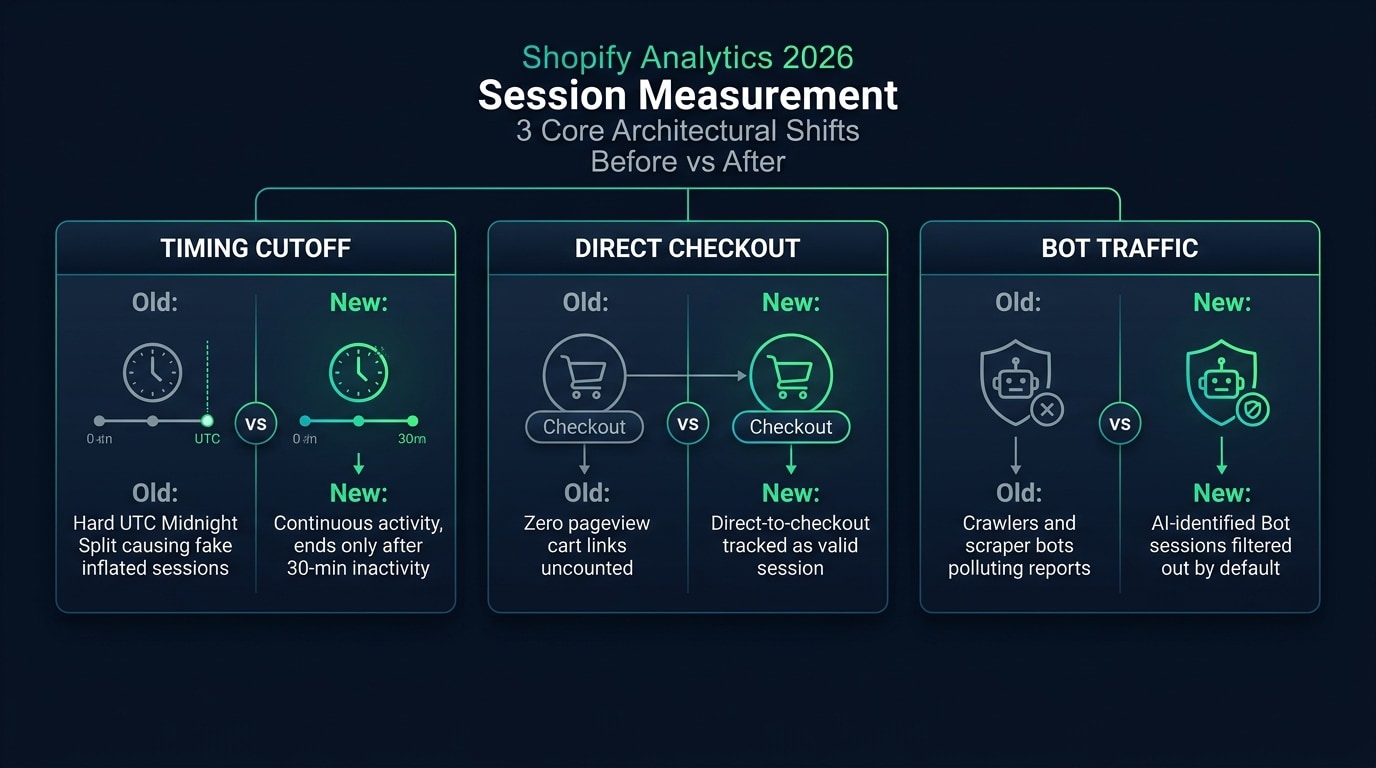 Comparison of Shopify Session Measurement Before and After the Three Rule Updates
Prior to this rollout, Shopify's session definition relied on legacy measurement standards. The September 2026 update introduces three core changes:
Change 1: Activity-Based Session Detection Without Midnight UTC Resets
Previously, Shopify automatically terminated active sessions at 00:00 UTC every day. Regardless of whether a shopper was actively browsing or adding items to cart, crossing UTC midnight closed the active session and started a new one for subsequent clicks. For DTC brands selling into North American or European time zones, 00:00 UTC often falls directly during evening shopping peaks—splitting a single continuous shopping journey into two separate sessions and inflating session counts.
Under the updated logic, forced midnight UTC resets are removed in favor of continuous user activity detection. A session now ends naturally only after 30 minutes of shopper inactivity, so continuous browsing across midnight UTC is counted as a single session.
Change 2: Direct-to-Checkout Visits Without Pageviews Are Now Counted
Previously, Shopify generally required at least one online store pageview for a visit to register as a session. In everyday DTC operations, however, substantial order volume originates from SMS campaigns, EDM emails, or creator promo links containing direct-to-checkout Cart Permalinks. When shoppers clicked those links and landed straight on the Checkout page without loading standard storefront theme templates, those visits were frequently missed under the legacy definition.
Under the new measurement engine, direct-to-checkout interactions without a preceding storefront pageview are properly captured and recorded in session reports.
Change 3: Identified Bots and Web Crawlers Are Filtered by Default
Public storefronts receive constant traffic from search engine crawlers, price-scraping scripts, and automated scanners. Historically, most Shopify reports mixed this non-human traffic with genuine shoppers, artificially depressing reported conversion rates.
Following the update, automated crawlers and bot traffic identified by Shopify are filtered out by default across all session reports:
- Custom reports that support segmentation now include a
Human or bot sessionfilter/dimension, allowing analysts to inspect bot-inclusive datasets when needed. - Home Overview and Live View enforce bot filtering automatically and cannot be toggled off, ensuring top-level dashboards reflect genuine human visitors only.
Chapter 2: Why Conversion Rate Rises While Orders Stay Unchanged
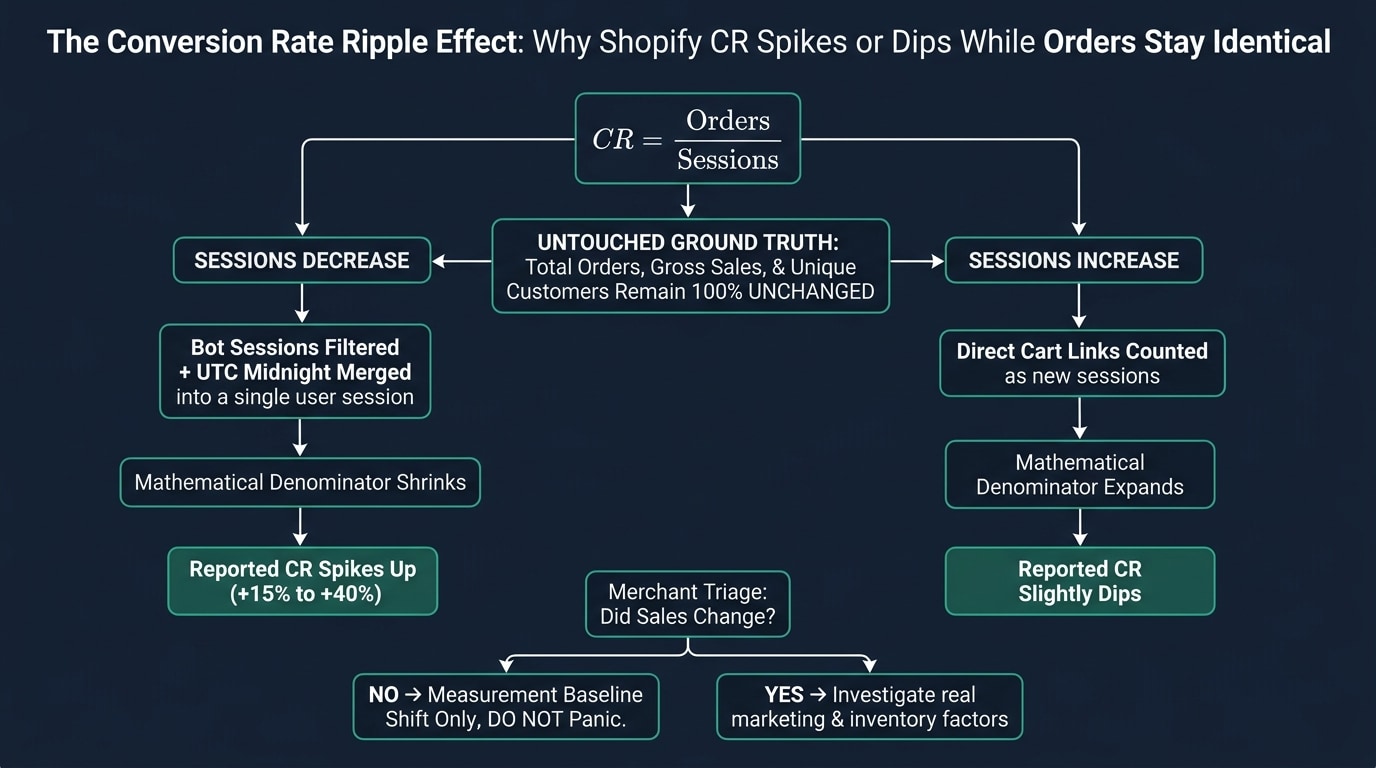 Shopify Conversion Rate Shift Impact and Analysis Decision Tree
To understand why your conversion rate moved overnight, examine the relationship between the numerator and denominator in the storefront conversion rate formula:
Site Conversion Rate (%) = (Total Orders / Total Sessions) × 100%
1. Numerator Business Metrics Remain Unchanged
- Total Orders remain completely unchanged.
- Total Sales / GMV remain completely unchanged.
- Customer Counts (unique ordering buyers) remain completely unchanged.
- Credit card settlements and payment gateway payouts are entirely unaffected by session definition changes.
2. Denominator Session Scope Reset
Because the denominator (Sessions) now follows updated counting rules, the calculated conversion rate percentage moves automatically even when order volume stays flat:
| Rule Change | Impact on Sessions (Denominator) | Impact on Reported Conversion Rate (CR) | Most Affected Storefront Types |
|---|---|---|---|
| Default bot & crawler filtering | Noticeable decrease (commonly -15% to -35%) | Conversion rate rises accordingly | Standard storefronts with large SKU catalogs, competitor scraping, or heavy crawler volume |
| Merging sessions across UTC midnight | Slight decrease (commonly -3% to -8%) | Conversion rate rises slightly | Cross-timezone stores whose peak shopping hours overlap 00:00 UTC |
| Backfilling direct-to-checkout visits | Slight increase (commonly +2% to +8%) | Conversion rate dips slightly | DTC brands heavily using SMS or email cart permalinks straight to checkout |
Media Buying Alert: If your admin conversion rate jumped from 1.8% to 2.5%, it is typically the mathematical result of stripping out bot traffic and cross-midnight duplicate sessions. Do not mistake this increase for landing-page optimization gains or ad targeting breakthroughs, and do not aggressively raise CPC bids based on this baseline shift.
Chapter 3: Interactive Impact Simulator: Estimate Your Store Impact
Use the interactive simulator below to model how denominator adjustments affect your reported conversion rate. Enter your store's monthly sessions and orders, then adjust estimated bot share and direct-to-checkout share to compare pre-update and post-update figures:
Chapter 4: Comparing Legacy and Updated Data for Cross-Period Analysis
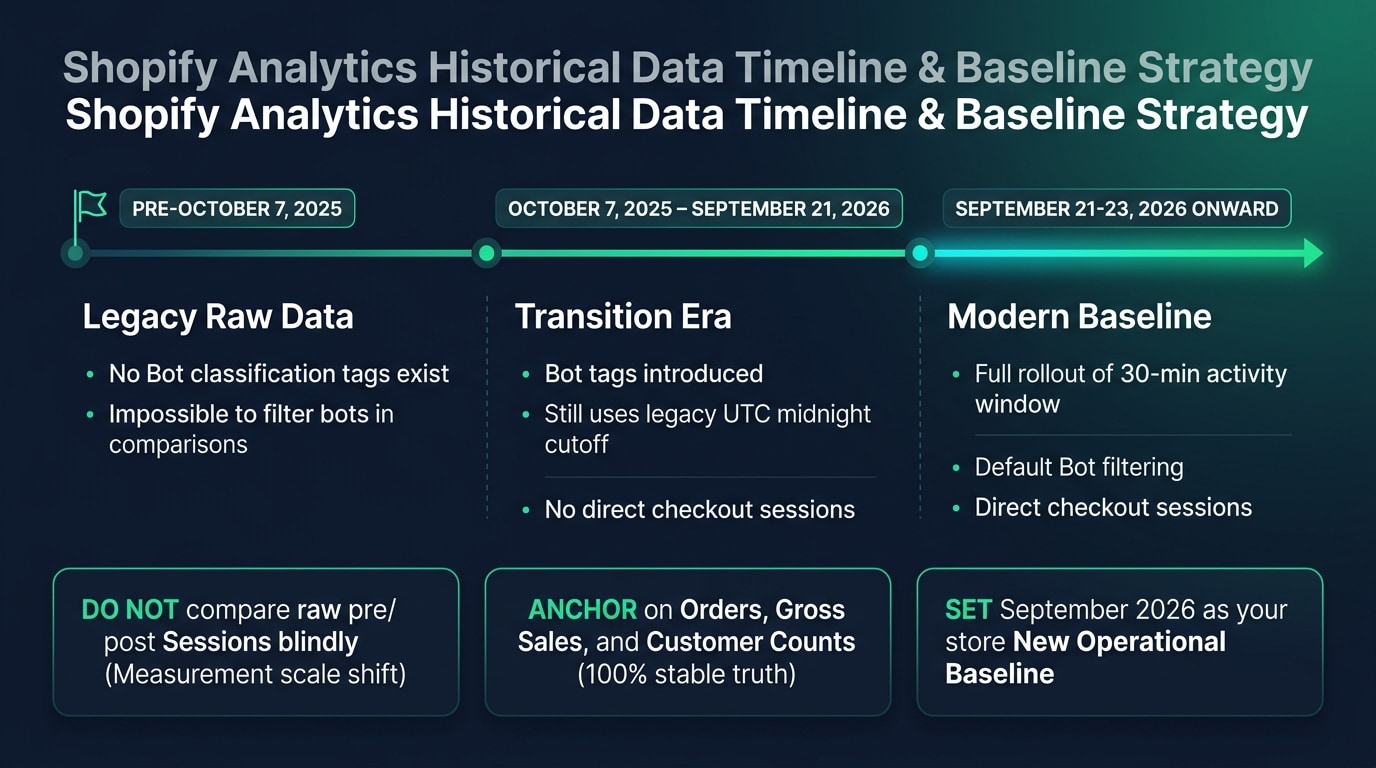 Shopify Historical Data Cutover Milestones and Baseline Adjustment Method
When preparing week-over-week (WoW), month-over-month (MoM), or year-over-year (YoY) reports, teams must account for the methodological break between legacy and updated session definitions.
Two Key Timeline Milestones
- Before October 7, 2025: Shopify's automated detection system only began tagging sessions with bot labels on and after October 7, 2025. Historical data prior to that date lacks bot classification flags and cannot be filtered symmetrically in reports.
- September 21–23, 2026: Full rollout of the new session measurement rules. Whenever a selected report date range spans September 21, 2026, Shopify displays an informational notice banner in the report editor regarding the measurement change.
4 Recommendations for Cross-Period Comparisons
- Evaluate cross-period performance by Orders and Revenue: When reviewing quarterly growth or peak promotional periods, Total Orders and Gross Sales / GMV maintain continuous, consistent definitions unaffected by session updates.
- Align filter settings in custom reports: When comparing data from late 2025 against post-September 2026 periods, verify that both date ranges apply the exact same
Human or bot sessionfilter configuration. - Establish a new post-late-September baseline: Legacy ecommerce benchmarks such as "1.5%–2.0% average DTC conversion rate" included unfiltered bot denominators. Because storewide conversion rates lift under the new standard, reset your analytical benchmarks using post-late-September 2026 data.
- Verify third-party BI tool definitions: If your team syncs Shopify data into Triple Whale, Northbeam, or an internal data warehouse, confirm whether external connectors ingest the updated
Sessionsfield to prevent metric discrepancies across dashboards.
Chapter 5: Affected Derived Metrics and Official Reporting Dashboards
Because session count serves as the foundational denominator for multiple analytics metrics, the following derived metrics and reports shift alongside Sessions and Conversion Rate:
1. 9 Affected Derived Metrics
| Metric Name | Field Name | Reason for Change |
|---|---|---|
| Total Sessions | Sessions | Decreases from bot filtering and cross-midnight merging; increases from counting direct-to-checkout visits |
| Online Store Conversion Rate | Online store conversion rate | Smaller session denominator generally raises the calculated conversion percentage |
| Add to Cart Rate | Add to cart rate | Computed as cart-add sessions divided by total sessions; smaller denominator increases the rate |
| Reached Checkout Rate | Reached checkout rate | Backfilling direct-to-checkout sessions yields more complete checkout funnel coverage |
| Checkout Conversion Rate | Sessions converted rate | Reflects true shopper conversion performance after removing automated crawler noise |
| Bounce Rate | Bounce rate | Filtering out single-hit automated bots typically lowers bounce rate for real visitors |
| Pageviews per Session | Pageviews per session | Removing single-page scraping bots reveals deeper browsing engagement among human shoppers |
| Average Session Duration | Average session duration | Excluding instant-exit bot hits increases average human session duration |
| Online Store Visitors | Online store visitors | Both live and historical visitor counts exclude identified automated scanning tools |
2. Key Affected Reports and Dashboards
- Analytics Overview Dashboard: Sessions, conversion rate, and conversion funnel stage cards.
- Live View: Global visitor map distribution and real-time active visitor counts.
- Acquisition Reports: Session breakdowns by traffic source, referrer domain, and landing page.
- Behavior Reports: Conversion funnel analysis, storefront search, and product recommendation reports.
- Marketing Reports: Campaign-attributed sessions and conversion reporting.
Chapter 6: Headless Storefront and Cookie Technical Troubleshooting
For standard storefronts running Online Store 2.0 themes (such as Dawn), Shopify handles this update automatically in the cloud with zero theme code changes required. However, if your brand runs a Headless architecture or multi-domain redirects, engineering teams should audit three technical configurations:
1. Troubleshoot _shopify_s Cookie Rotation Anomalies (Session Cookie Rotation)
Shopify relies on the _shopify_s cookie to maintain session state. If a custom frontend repeatedly overwrites or clears this cookie during route transitions or subdomain switches—or if a reverse proxy strips Set-Cookie response headers—Shopify classifies every click from the same shopper as a brand-new session, artificially inflating session counts. If admin alerts appear, frontend engineers should inspect network traces to verify _shopify_s persistence.
2. Upgrade Hydrogen Tracking Cookie Configuration
For storefronts built on Shopify's official Hydrogen (Remix-based) framework, check your @shopify/hydrogen package version and consult Shopify's official migration guide ("Migrating tracking cookies in Hydrogen") to confirm tracking cookies are preserved reliably across session contexts.
3. Forward Required Client Headers from Custom Headless Storefronts (Next.js / Nuxt)
Teams integrating custom frameworks with the Storefront API must ensure Cart and Checkout requests forward Shopify-Storefront-Session-Token, the client's real IP address, and User-Agent. Missing client headers on server-side rendered (SSR) requests can cause legitimate human traffic to be misclassified as bot activity. Once technical checks are complete, marketing and BI teams should use the full October 2026 calendar month as the new baseline for Q4 peak-season conversion benchmarks.
Found this actionable? Copy standard citation & summary
Formatted with canonical attribution link and executive summary—ready for Slack, Notion, or LLM context.
Put Into Practice: Companion Browser Workbenches
Shopify GTM & GA4 Web Pixel Generator
Generate production-ready Shopify Customer Events Web Pixel code for GA4, Meta, and TikTok.
UTM Builder Pro Matrix Workspace
Reverse URL parser, GA4 channel group diagnostics, and dynamic ad macro batch CSV export.