
Google Ads Search Insights Tool: 4 Diagnostic Views, 5 Query Lifecycle States & AI Match Auditing
Key Takeaway: Auditing How Google AI Matches Queries to Copy and Landing Pages
Available inside the Google Ads Insights and reports menu, Search insights merges 3-year indexed category search volume with a four-stage Search ad insights table—showing exactly how searches matched ads, what copy Google AI expanded or served, and where users ultimately landed, grouped into 5 actionable query states.
1. Locating Search Insights & Why It Matters Now
As automation expands across Broad Match, Performance Max, and Search AI features, media buyers increasingly struggle to track which AI-matched queries absorbed spend and which dynamic headlines or expanded landing pages were served to prospects.
Community practitioner Govind Singh recently surfaced live screenshots from an active Google Ads account on X, spotlighting the Search insights workspace documented across Google Help guides and Google Ads' June 2026 reporting announcement. Within the left-hand navigation panel, open Campaigns → Insights and reports and select Search insights directly above Search terms.
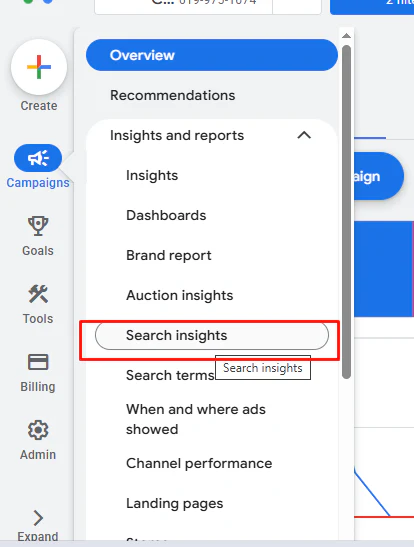 Google Ads Insights and reports navigation menu highlighting Search insights
2. Four Diagnostic Dimensions in Search Ad Insights
According to Google, Search Insights leverages AI-built report scaffolding so junior specialists and cross-functional marketers can uncover insights that previously took years of manual pivot-table auditing. The performance summary table separates aggregate All traffic against Google AI contribution, followed by four interactive breakdown tabs:
- How searches matched ads: Distinguish exact advertiser-supplied triggers from AI-inferred semantic matches.
- What people searched: Surface raw user search phrasing and emerging long-tail product modifiers.
- Which ad copy and assets showed: Review advertiser assets side by side with copy matched, written, or expanded by Google AI.
- Where people landed: Verify whether automated URL expansion routed high-intent clicks onto converting product or collection URLs.
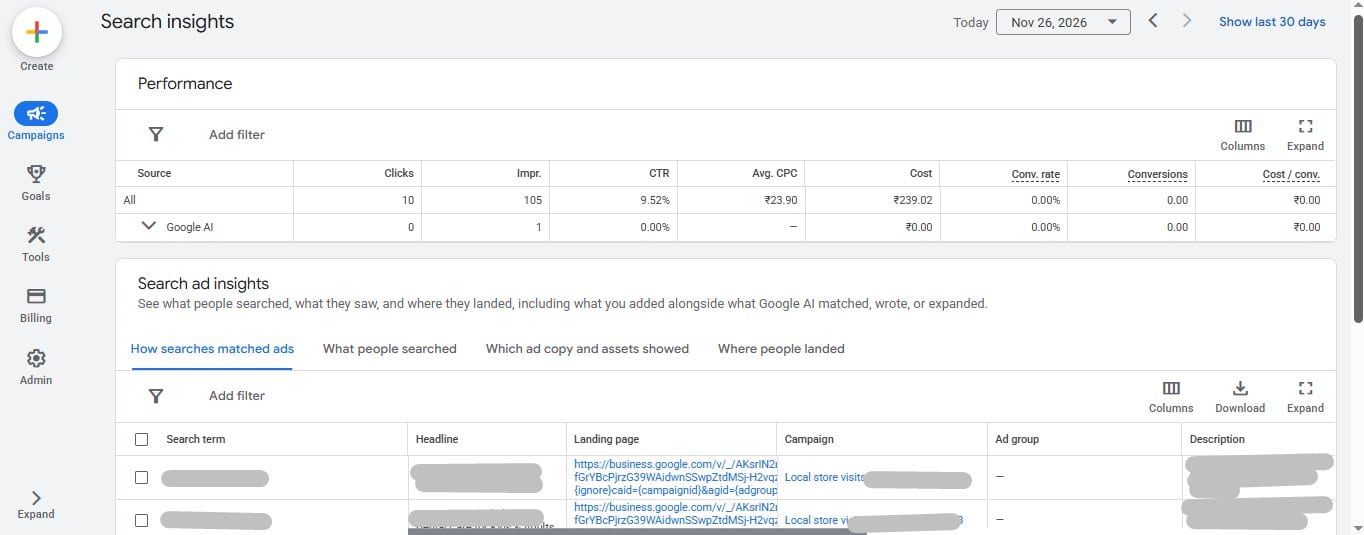 Google Ads Search insights workspace showing Google AI source breakdown and four-tab query diagnostics
3. Five Query Categories & Lookback Windows Explained
Alongside Trends (showing indexed search interest for your topic over the past 3 years), Google classifies surfaced queries into five lifecycle categories so advertisers can separate core cash-cow keywords from early breakout demand:
| Query Category | Statistical Window & Definition | Recommended Execution Play |
|---|---|---|
| Top | Queries with the highest total search volume in the topic | Protect exact/phrase coverage, margin, and SKU inventory depth |
| Rising | Queries showing sustained momentum growth over the past 6 months | Spin up dedicated ad groups, headlines, and tailored landing pages |
| Emerging | Newly surfacing search terms recently gaining traction | Seed early creative tests and prioritize SEO/GEO content capture |
| Sustained | Queries holding consistently high demand over the past 18 months | Lock into evergreen budget anchors with strict ROAS guardrails |
| Declining | Queries experiencing falling volume over the past 3 months | Audit for seasonality, outdated SKU models, or negative-keyword exclusions |
4. Three Documented Scope Limitations to Keep in Mind
To prevent reporting misinterpretation when sharing Search Insights exports with leadership, Google highlights three strict data constraints in its official documentation:
- Driven by User Click Behavior: Query associations do not require exact lexical keyword overlap—Google links queries to your business themes based on aggregate user click behavior across similar ads and pages.
- No Demographic or Audience Filtering: Age, gender, interest, and audience segment definitions do not apply to Search Insights trend datasets.
- Country-Level Geographic Granularity: Unlike city or ZIP-level campaign geographic breakdowns, Search Insights trend data is typically only surfaced at the Country level.
5. Closing the Attribution Loop on AI-Expanded Landing Pages
Notice in the live UI screenshot how the Landing page column exposes full tracked query parameters (including dynamic ValueTrack macro templates such as {campaignid} and {adgroupid}). When Google AI dynamically swaps or expands destination URLs under heavy seasonal spend, broken parameter encoding can quickly leak paid sessions into Google Analytics (direct).
Whenever you review the Where people landed tab inside Search Insights:
- Verify ValueTrack macro syntax and clean URL preservation using EVaoo UTM Builder Pro for Google Ads;
- Test whether query strings survive site redirects and consent flows inside the GA4 Channel Prediction & UTM Terminal;
- Explore related platform transparency controls in our Google Search Ranking Hub & AI Training Guide or return to the Google Marketing Hub.
Found this actionable? Copy standard citation & summary
Formatted with canonical attribution link and executive summary—ready for Slack, Notion, or LLM context.
Put Into Practice: Companion Browser Workbenches
UTM Builder Pro Matrix Workspace
Reverse URL parser, GA4 channel group diagnostics, and dynamic ad macro batch CSV export.
Shopify GTM & GA4 Web Pixel Generator
Generate production-ready Shopify Customer Events Web Pixel code for GA4, Meta, and TikTok.