
Google Ads Promotion Mode Now Supports Standard Shopping Campaigns: Rules, Tolerance Stacking & Setup SOP
Key Takeaway: Standard Shopping Campaigns Join Google Ads Promotion Mode
According to Google's updated English Help documentation, the open-beta Promotion Mode now officially supports Standard Search, Standard Shopping, and Performance Max campaigns. Retailers can pre-schedule a 5% to 90% Target ROAS reduction and optional extra daily budget across a 3-to-14-day promo window without manually disrupting Smart Bidding learning cycles.
1. Documentation Update: Why Shopping Inclusion Matters
When Google first unveiled Promotion Mode in its June 15, 2026 Bidding & Budgeting announcement, eligibility was strictly confined to Search and Performance Max campaigns. For performance teams running granular SKU-tiered Standard Shopping campaigns to protect branded queries and high-margin hero products, peak events previously forced manual Target ROAS cuts or short-lived Seasonality Adjustments.
As of November 27, 2026, Google's English support page (answer/18111661) explicitly lists Standard Search, Shopping, and Performance Max as eligible campaign types, whereas localized German, French, and Spanish pages still reflect the earlier wording—indicating a gradual global rollout.
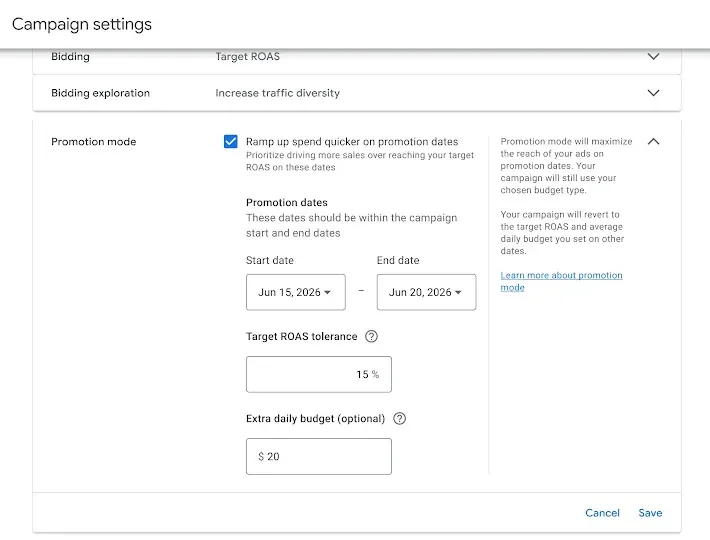 Google Ads Promotion Mode settings drawer showing date picker, Target ROAS tolerance percentage, and extra daily budget
2. How Tolerance Math & Eligibility Guardrails Work
Enabling Ramp up spend quicker on promotion dates inside Campaign Settings configures a bounded 3-to-14-day promotion window. When the promotion ends, the campaign automatically reverts to its baseline Target ROAS and average daily budget.
2.1 Target ROAS Tolerance & Budget Constraints
- Tolerance Reduction Math: Google multiplies your baseline Target ROAS by
(1 - tolerance%). Using Google's documented example, a 500% Target ROAS paired with a 20% tolerance shifts the live promotional target to 400% Target ROAS. - Average Daily Budget Only: Optional extra daily spend stacks strictly on top of campaigns using an Average Daily Budget. Campaigns configured with a Campaign Total Budget are ineligible for automated daily spend top-ups and require manual total-budget increases.
2.2 Watch Out for Smart Bidding Exploration Stacking
Before activating Promotion Mode on existing high-spend Shopping campaigns, audit whether Smart Bidding Exploration is already enabled:
- Activating Promotion Mode automatically enables Smart Bidding Exploration for the duration of the sale, even if the setting was previously off.
- If Exploration was already turned on beforehand, both tolerances stack cumulatively: a preexisting 20% Exploration relaxation plus a 20% Promotion Mode tolerance creates a combined 40% Target ROAS drop (lowering 500% all the way to 300%), which can rapidly over-spend low-margin SKUs if unguarded.
2.3 Eligibility Matrix & Disqualifiers
| Requirement Area | Eligible for Promotion Mode | Ineligible / Disqualified | Recommended Pre-Sale Action |
|---|---|---|---|
| Campaign Type | Standard Search, Standard Shopping, PMax | Display, Video, Demand Gen | Confirm option visibility in English campaign settings |
| Bid Strategy Scope | Campaign-level Target ROAS | Portfolio Bid Strategies | Migrate core promo campaigns off shared portfolios early |
| Budget Configuration | Standalone Average Daily Budget | Shared Budgets, Campaign Total Budgets | Detach shared budgets at least one conversion cycle ahead |
| Experiment History | Clean standalone campaigns | Campaigns that ever ran Experiments | Launch clean holiday campaigns if tests ran previously |
| CPC Bid Caps | Uncapped tROAS (Google recommended) | tROAS with Max CPC caps | Remove restrictive CPC caps during peak liquidity |
3. Performance Max Differences & Reporting Visibility
For Performance Max campaigns, Google notes that Promotion Mode triggers Smart Bidding Exploration across both Search and Shopping inventory as well as text and shopping ad formats. However, campaigns deriving most of their volume from non-Search/Shopping placements (such as Display or YouTube) will experience muted incremental lift.
Once live, active promotion statuses appear across four surfaces: Campaign Settings, the Campaigns Table, the Seasonality Adjustments menu, and Bid Strategy & Budget Reports, allowing analysts to account for intentionally lower promotional ROAS targets during post-campaign reviews.
4. Pre-Launch SOP & Profit Guardrails
- 48-Hour Buffer for New Campaigns: Google states that brand-new campaigns must be created at least 48 hours before promotion start dates, while established campaigns should run cleanly on their baseline daily budget for at least one full conversion cycle before entering Promotion Mode.
- Start-Date Lock vs. End-Date Flexibility: Once a promotion goes live, the start date can no longer be modified, and mid-promo Target ROAS or budget tweaks must be handled inside Promotion Mode settings. Teams can still stop a promotion early or shift the end date within the 14-day ceiling.
- Validate Break-Even Margins & Attribution First: Reserve 1–2 post-sale conversion cycles for Smart Bidding stabilization after targets snap back. Before locking in a 5%–90% tolerance, model your floor margin inside the EVaoo Break-Even ROAS & MER Calculator to ensure
Baseline ROAS × (1 - Combined Stacked Tolerance)clears variable COGS, and validate every promotional landing tag with UTM Builder Pro for Google. - Related Reading: Pair this update with our breakdown on Google Ads AI Max, PMax & Smart Bidding Exploration Scaling or browse all guides in the Google Marketing Hub.
Found this actionable? Copy standard citation & summary
Formatted with canonical attribution link and executive summary—ready for Slack, Notion, or LLM context.
Put Into Practice: Companion Browser Workbenches
UTM Builder Pro Matrix Workspace
Reverse URL parser, GA4 channel group diagnostics, and dynamic ad macro batch CSV export.
Shopify GTM & GA4 Web Pixel Generator
Generate production-ready Shopify Customer Events Web Pixel code for GA4, Meta, and TikTok.