
Complete Guide to Stape CMP Setup on Shopify: Anti-Deadlock Execution, Checkout Debugging, 10K Free Tier & 8 Pricing Tiers
 Complete Guide to Stape CMP Setup on Shopify: Anti-Deadlock Execution, Debugging & Pricing
Terminology Clarification & Core Guide (CMP vs. MCP): This guide is compiled from EVAOO News Intelligence and official Stape technical documentation (November 2026 update). Note that in Shopify privacy banners and server-side tracking, CMP stands for Consent Management Platform—not MCP (Model Context Protocol) used in LLM tooling.
For Shopify DTC stores running GA4, Google Ads, Meta Pixel / CAPI, or TikTok Pixel simultaneously, Stape's built-in CMP delivers a rare win-win for compliance and attribution: zero extra license fees, first-party script delivery via Custom Loader to resist ad blockers, native bidirectional sync between Shopify Customer Privacy API and Google Consent Mode v2, and up to
3 yearsof retained consent audit logs. Below, we walk through zero-deadlock Shopify configuration and 3-layer debugging, followed by a full breakdown of the free allowance (10,000 Requests/monthlimit) and all8Stape pricing tiers.
1. Why Native Shopify Cookie Banners and Generic Apps Fall Short: 3 Architectural Pitfalls
Many cross-border merchants enable Shopify's default Customer Privacy cookie banner or install a free App Store banner plugin, only to discover severe ad-platform conversion loss, unexplained GA4 traffic drops, or marketing tags still firing before European visitors grant consent.
1.1 Cookie Banner vs. Full Consent Management Platform (CMP)
| Capability Dimension | Native Shopify Cookie Banner | Stape CMP (Full Consent Management Platform) |
|---|---|---|
| Core Purpose | Displays a basic consent popup and records store-level preferences | Stores consent choices + syncs full-stack tag states + governs third-party scripts and server-side routing |
| Tool Governance Scope | Primarily governs Shopify-owned tools (e.g., native Shopify Cookies/Pixels) | End-to-end control over GA4, Google Ads, Meta, TikTok, Microsoft Clarity, and UET |
| Google Consent Mode v2 | Lacks granular advanced cookieless ping orchestration | Native support for Google Consent Mode v2 and dataLayer event streams |
| Ad-Blocker Resilience | Generic apps load third-party JS that slows pages and gets blocked by AdBlockers | Served from your store's first-party domain via Custom Loader, unified with sGTM tracking |
| Compliance Audit Retention | Lacks granular server-side audit log exports for regulators | Retains complete Consent Logs for 3 years free (including Consent ID and GPC signal) |
1.2 Three Most Common Shopify Compliance & Tracking Pitfalls
- Consent State Disconnected from Shopify's Privacy API (Silent Data Loss): Under the hood, Shopify uses the Customer Privacy API to govern data collection for built-in pixels and ecosystem apps. If a third-party CMP fails to synchronize bidirectionally with this API, Shopify may still treat a visitor who clicked "Accept All" as unconsented and silently drop order events.
- Physical Environment Split Between Storefront and Checkout: Shopify's storefront theme and checkout run in two completely isolated execution environments—especially after migrating to the sandboxed Checkout Extensibility architecture. Teams that hardcode CMP snippets inside
theme.liquidfrequently lose consent state the moment a shopper enters checkout, causing state to fall back to "Denied" and severely undercountingbegin_checkoutandpurchaseevents. - Brute-Force GTM Blocking Breaks Google Consent Mode v2: Many banner plugins simply block the entire GTM container until a visitor clicks "Accept." This destroys Google's Advanced Consent Mode, which requires Google tags to load in a restricted state before consent is granted so they can send cookieless pings for conversion modeling.
2. Step-by-Step 7-Step Setup: Zero-Code Stape CMP Configuration on Shopify (Anti-Deadlock SOP)
Using Stape CMP requires no extra standalone CMP app in Shopify and no brittle theme code hacks. Simply meet the prerequisites below and execute each step in sequence.
Prerequisites (All Required)
- An active Stape account (the
Freetier works); - A server-side GTM (sGTM) container hosted on Stape and bound to your store's custom subdomain;
- The
Custom Loaderpower-up must be enabled and deployed—Stape CMP delivers its script through Custom Loader on your first-party domain so it bypasses ad blockers and stays connected through checkout (Custom Loader is included free even on theFreeplan).
Step 1: Create CMP in Your sGTM Container & Enable Shopify Customer Privacy API
- Log in to your Stape admin → open your target sGTM container → click the
CMPtab in the top navigation bar; - Enter the Shopify store domain where the banner should appear (e.g.,
yourstore.com) and clickCreate CMP; - Open
Integrations & consent signalsand immediately toggle ONShopify Customer Privacy APIso visitor choices made in the banner sync straight into Shopify's native privacy core.
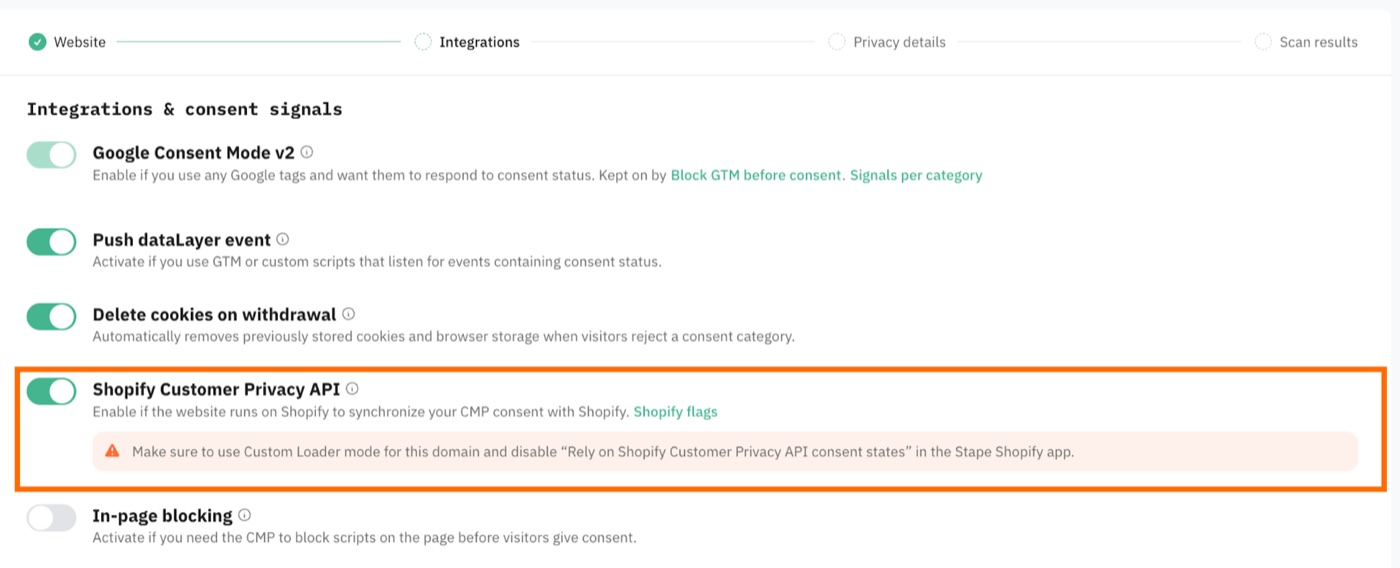 Step 1: Enable the Shopify Customer Privacy API sync toggle inside Stape CMP Integrations & consent signals
Step 2: 🚨 [Critical Anti-Deadlock Step] Configure the Official Shopify Stape App
This is where 90% of Shopify merchants trigger an infinite self-blocking loop. Verify every checkbox carefully:
- Open the free official
Stape Conversion Trackingapp in Shopify Admin → go to theInject GTMtab; - After checking
Insert web GTM scriptto load your web GTM container, make sureRely on Shopify Customer Privacy API consent statesstays UNCHECKED (disabled)! - Enable both
Add custom domainandAdd custom loader, then paste your exact Container identifier (e.g.,rmawtmpa) found on your Stape sGTM container'sSettingspage.
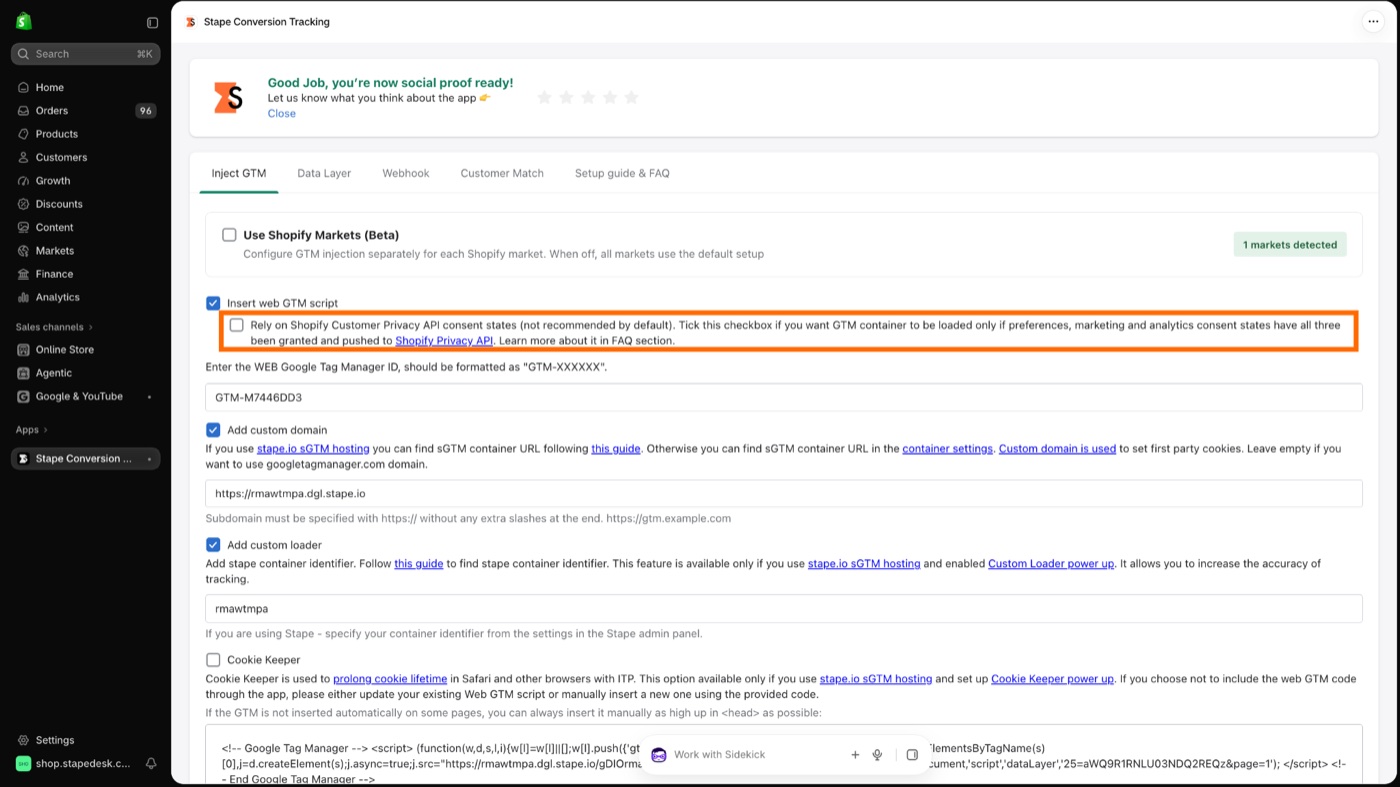 Step 2A: Keep "Rely on Shopify Customer Privacy API consent states" unchecked inside the Shopify Stape Conversion Tracking app
Why must
Rely on Shopify Customer Privacy API consent statesNEVER be checked? If that option is enabled, the Shopify Stape app blocks Web GTM from loading whenever any consent category is denied. Because Stape CMP itself is injected via Custom Loader inside GTM, you create a fatal deadlock: GTM is blocked ➔ Custom Loader never runs ➔ the CMP banner never appears. Visitors cannot see the banner or update preferences, and all site tracking grinds to a halt.
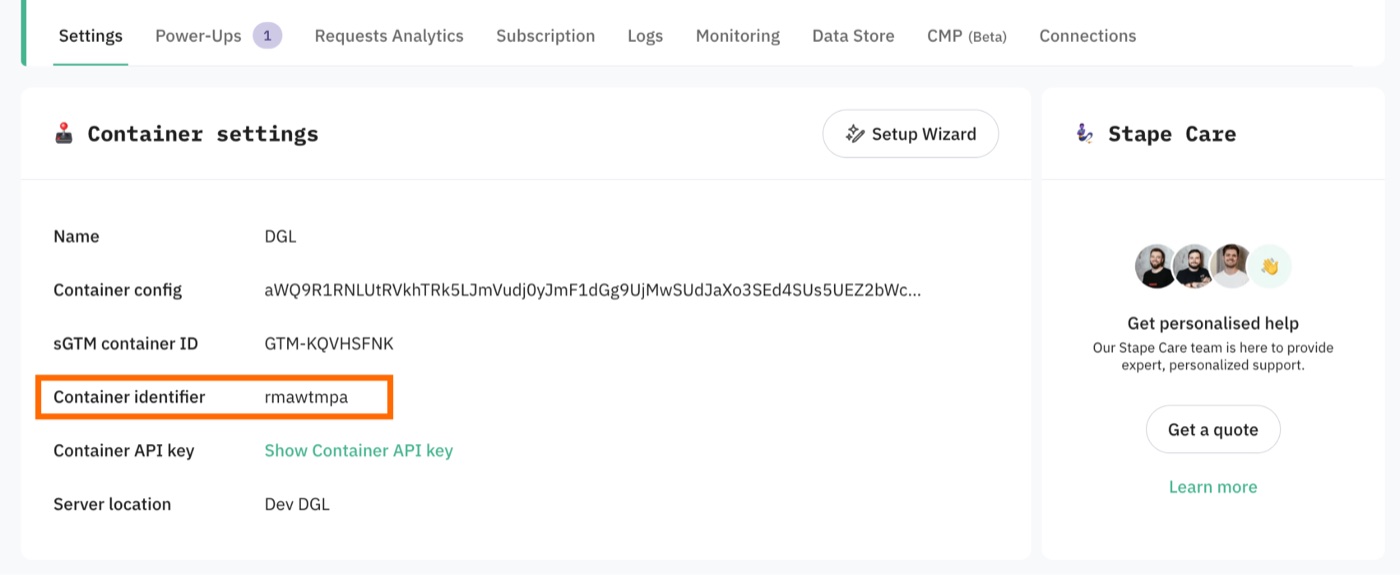 Step 2B: Copy your exact Container identifier from Stape sGTM Container Settings into the Shopify App
Step 3: Enable Core Consent Signals & Cookie Deletion Rules for Your Tracking Stack
Return to Integrations & consent signals inside Stape CMP and enable the switches matching your store's ad and analytics stack:
Google Consent Mode v2(Mandatory): Required for GA4, Google Ads conversion tracking, and remarketing to transmit the four standard signals (ad_storage,analytics_storage,ad_user_data, andad_personalization);Push dataLayer event(Mandatory for Meta/TikTok): Pushesstape_cmp_consent_defaulton load andstape_cmp_consent_updatewhenever consent updates in the browser'sdataLayer. (You can skip this if all tags in Web GTM use Google'sBuilt-in Consent Check, but keep it enabled if you run Meta Pixel, TikTok Pixel, or custom scripts that need trigger gating);Delete cookies on withdrawal(Strongly Recommended): Automatically purgesCookies,localStorage, andsessionStorageentries linked to rejected categories on page load or consent withdrawal (note: due to browser security rules,HttpOnlycookies and cookies set on third-party domains cannot be deleted from the client side);In-page blocking: Enable only if legacy tracking scripts are hardcoded directly in your HTML outside GTM governance;Microsoft Clarity / UET Consent API: Enable if you run Microsoft Advertising (Bing Ads) or Microsoft Clarity heatmaps;IAB TCF&IAB GPP - US opt out signal: Enable when serving European programmatic ad vendors or US multi-state privacy compliance frameworks.
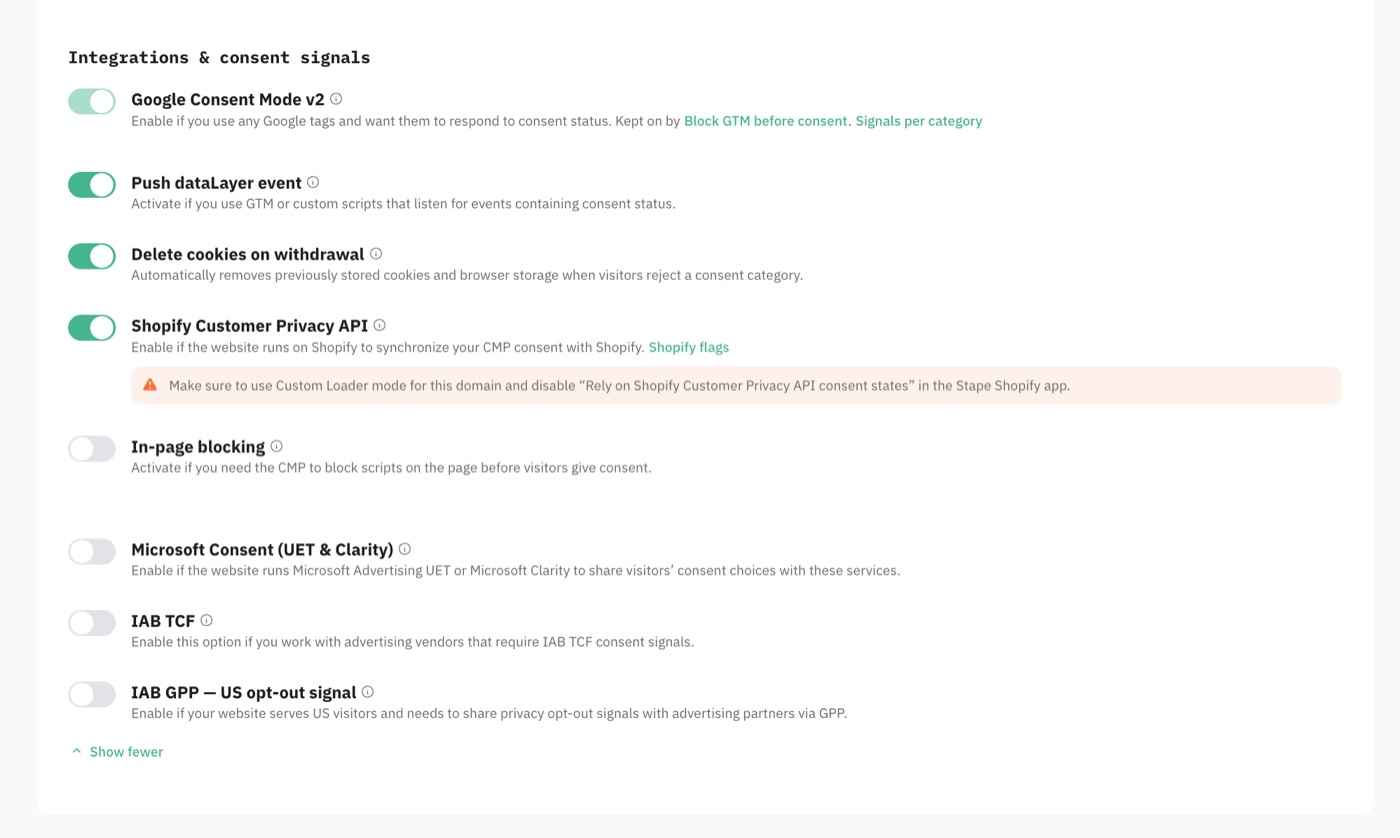 Step 3: Consent signals panel in Stape CMP showing Google Consent Mode v2 and Delete cookies on withdrawal
Step 4: Complete Privacy Disclosures, Audit the Cookie Scanner Inventory & 5 Categories
- Under Disclosures, fill out the three required fields:
Privacy Policy URL(your store's privacy policy page),Privacy Contact Details(e.g.,[email protected]), andDisplayed Contact Role(e.g.,Data Protection OfficerorPrivacy Team); - Review Stape's automated Cookie Inventory scan results and import detected trackers into your compliance list with one click. If anything is missing, switch to the
Cookiestab, click+ Add new entry, specify the vendor and purpose, and clickCreate; - Review the five default categories (
Strictly necessary—always active,Preferences,Functional,Analytics, andMarketing). Default copy and translations are maintained automatically by Stape; to customize wording deeply, click the three-dot menuEdit -> Unlinkto detach managed copy (or clickAdd categoryto create a custom bucket).
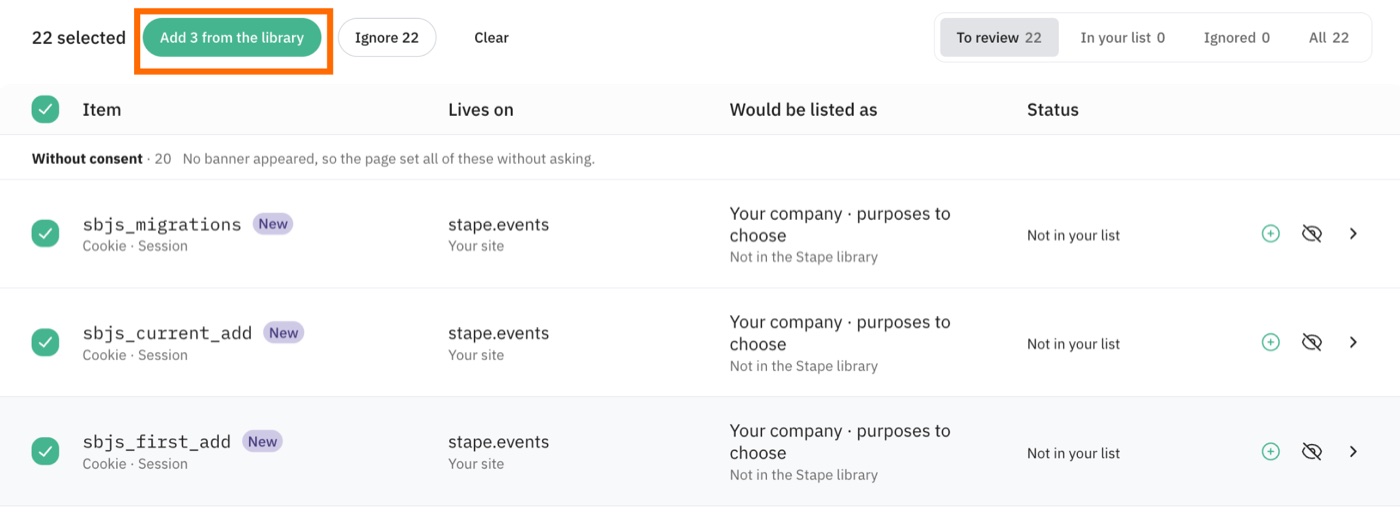 Step 4: Review Stape CMP automated Cookie Inventory scan results and import entries into your compliance catalog
Step 5: Customize Regional Banners & Quota-Saving Settings in Consent Builder, Then Publish
- Open
Consent Builder: Switch freely between desktop and mobile previews to match your brand palette, banner position, and layout;- 💡 Plan Difference Note: Hiding or customizing the Stape mascot and Stape Logo (white-labeling) on the left side of
Consent Builderrequires upgrading the container toBusinesstier or higher; Free and Pro tiers retain Stape branding.
- 💡 Plan Difference Note: Hiding or customizing the Stape mascot and Stape Logo (white-labeling) on the left side of
- Open
Localization: Configure explicit opt-inConsent Bannerrules (default denied) for the EU/EEA and UK (UK GDPR / PECR), and enableOpt-out Noticerules for US states such as California (CCPA), Colorado (CPA), and Connecticut (CTDPA)—with automatic Global Privacy Control (GPC) signal support. SetFallback language(defaults to English) for unmatched visitor locales; - Open
Settings→Site/Visitorsto configure three critical domain and quota-saving controls:Consent scope: SelectAll subdomainsif your storefront, checkout, or blog span different subdomains so consent carries across all of them;Regional consent cookies: Set toClean upso cross-region travelers (e.g., visiting from the US and later from the EU) clear stale consent cookies and receive the proper regional banner;Visitors outside regulated regions: ChooseShow a notice(informational without blocking tags) orStay silent(implicit consent without popup);- 💰 Two Must-Enable Settings to Save Free Quota: Turn ON
Hide the consent banner from botsand setDefault consent state for botstoDeniedso automated bot crawlers do not burn through your monthly Stape Request allowance;
- Click
Publishto push live. Stape CMP writes thestape_consentcookie in the visitor's browser and uses a temporary buffer cookie (stape_cmp_audit_pending) to retry audit log delivery on flaky connections before cleaning it up automatically.
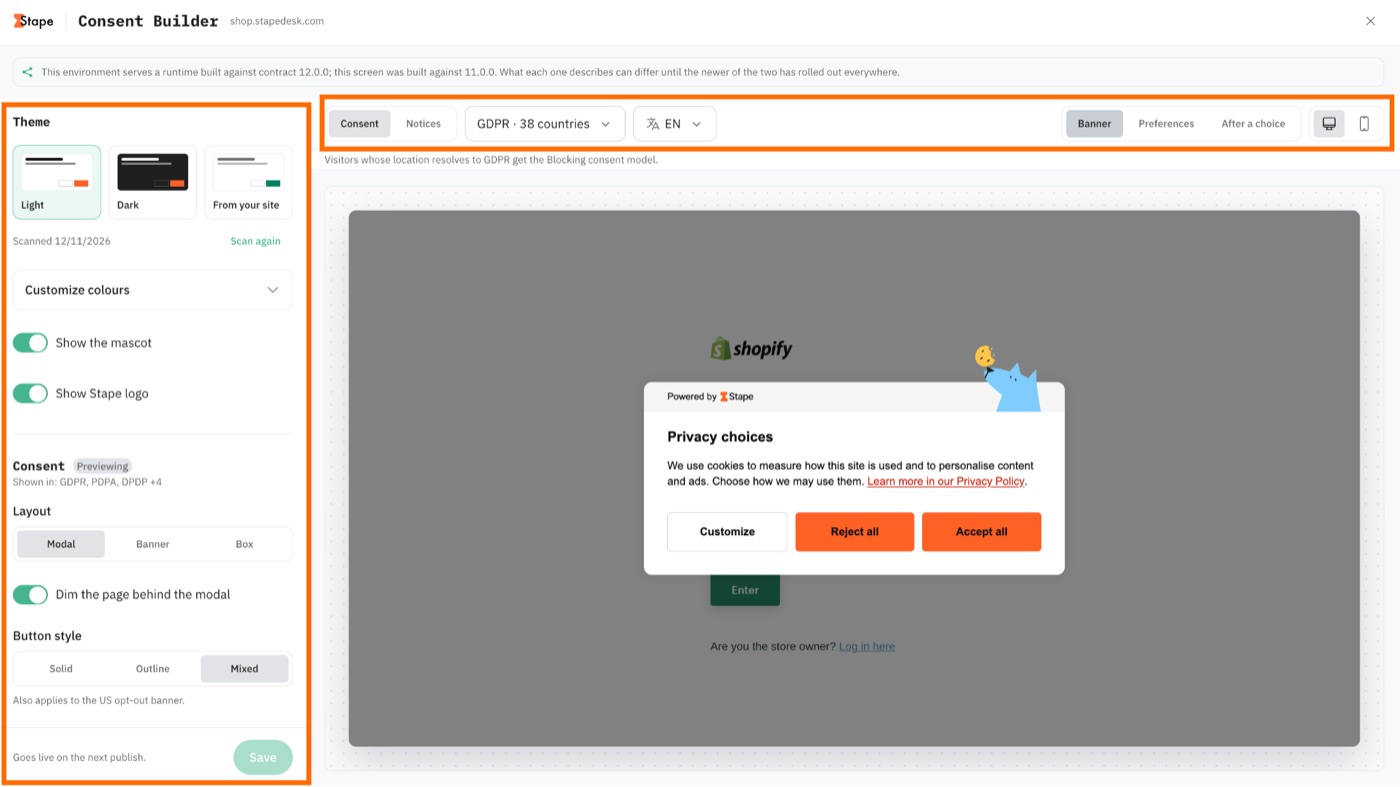 Step 5: Preview and customize desktop and mobile consent banner styling in Stape Consent Builder
Step 6: Audit & Adjust Web GTM Container Tag Triggers
Stape CMP renders its banner without needing an extra CMP tag inside GTM, but you should verify how your Web GTM tags respond to consent updates:
- Google Tags (GA4 / Google Ads / Floodlight): Include
Built-in Consent Checkout of the box. WithGoogle Consent Mode v2enabled, they automatically adapt measurement behavior based onad_storageandanalytics_storage; - Meta / TikTok / Third-Party Marketing Tags: Add
Additional Consentrequirements in tag settings or gate triggers onstape_cmp_consent_update(orstape_consent_updateif installed via Stape Setup Wizard) combined with a consent status variable so they fire only after Marketing consent is granted.
3. 3-Layer Debugging SOP (Web GTM + Checkout Sandbox + sGTM) & 3-Year Consent Logs
Never declare launch complete just because a banner pops up on the homepage. Use the Stape GTM Helper Chrome extension to trace consent end-to-end across Web GTM, Shopify's Checkout sandbox, and your sGTM server container.
3.1 Layer 1: Verify Event Sequence & 3-Column Consent State in Web GTM Preview
- Open Preview mode in both your Web GTM and sGTM containers simultaneously;
- Visit your storefront and confirm
Consent Defaultandstape_cmp_consent_defaultfire first on load (check theConsenttab's first column,On-page Default, to verify protected categories start asDenied); - Click "Accept All" or toggle specific categories off, then locate
stape_cmp_consent_update(stape_consent_updatevia Setup Wizard) in the left event stream; - Click that event and open the
Consenttab to verify all three columns—On-page Default(initial denied) ➔On-page Update(user choice) ➔Current State(active state)—and confirm the update completes strictly beforepage_view,add_to_cart, or other business tags fire.
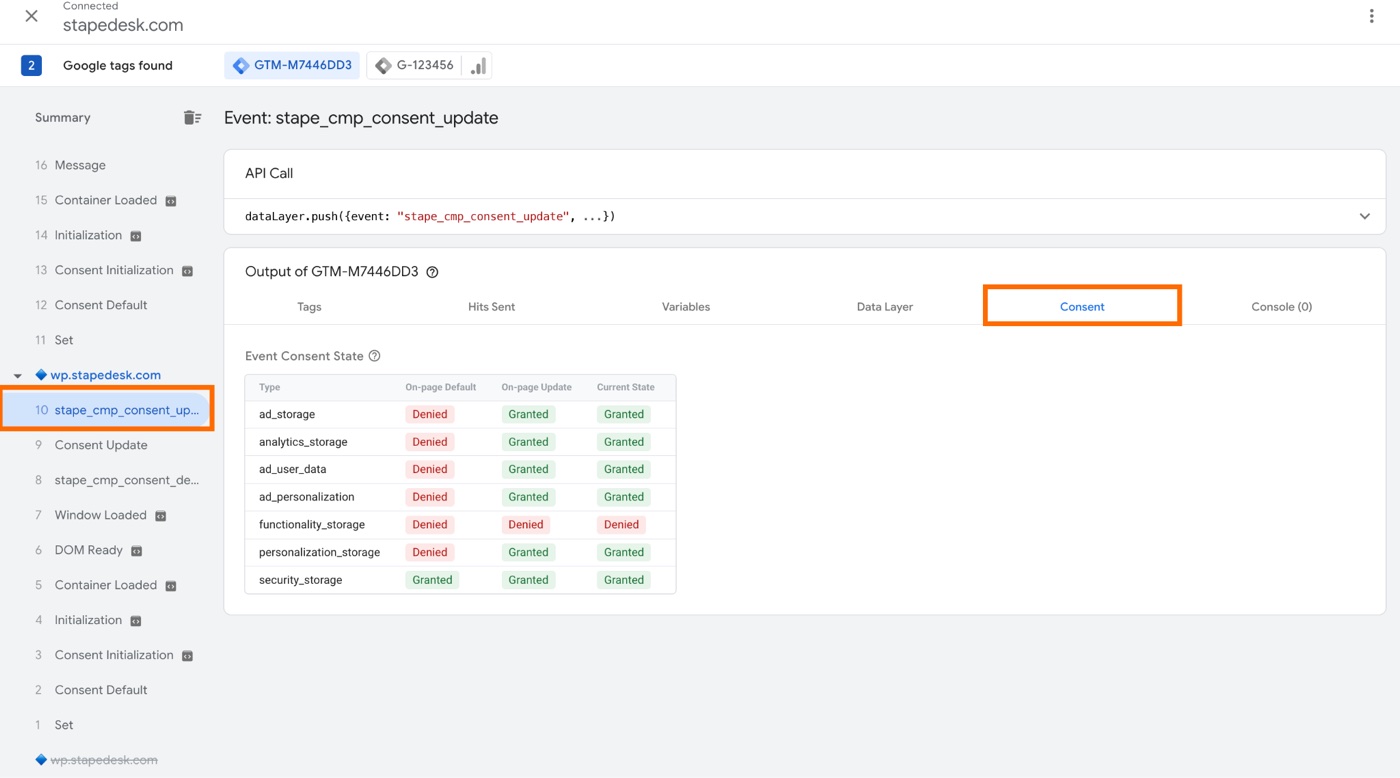 Step 7: Inspect the stape_cmp_consent_update event Consent tab in Web GTM Preview to verify all three state columns
3.2 Layer 2: Cross-Environment Verification in Shopify Checkout Extensibility
Because of Shopify Customer Privacy API, Checkout Extensibility, and Web Pixels sandbox isolation, checkout events do not appear in standard Web GTM Preview windows by default. Use either official method below to inspect checkout state:
- Direct Browser Console Check (Fastest Zero-Setup Method): On the Shopify checkout page, press
F12to open Chrome DevTools → Console and run:JS1 lines1 google_tag_data.ics.entries - Stape GTM Helper Injection Mode: Open the Stape GTM Helper Chrome extension → switch to the
Inject GTMtab → clickEnable injection→ enter your store domain and WebGTM-XXXXXXID, then save to inspect tag and consent firing directly inside checkout.
3.3 Layer 3: Server-Side sGTM Parity & 3-Year Consent Logs Audit
- Open the Stape GTM Helper extension →
Settingstab → enableConsent mode server side(GTM server preview hides consent states by default unless this toggle is active); - Switch to sGTM Preview, click the latest incoming request, and verify that
ad_storageandanalytics_storagematch Web GTM Preview 100%; - Open
CMP -> Consent logsin your Stape account to inspect auditable records. Stape stores every consent log free for3 years, capturingConsent decision(per-category choices), timestamp, source, geolocation country, root domain (without sensitive full URL paths),GPC status, TCF string, configuration version, and a globally uniqueConsent IDfor locating or deleting individual user records.
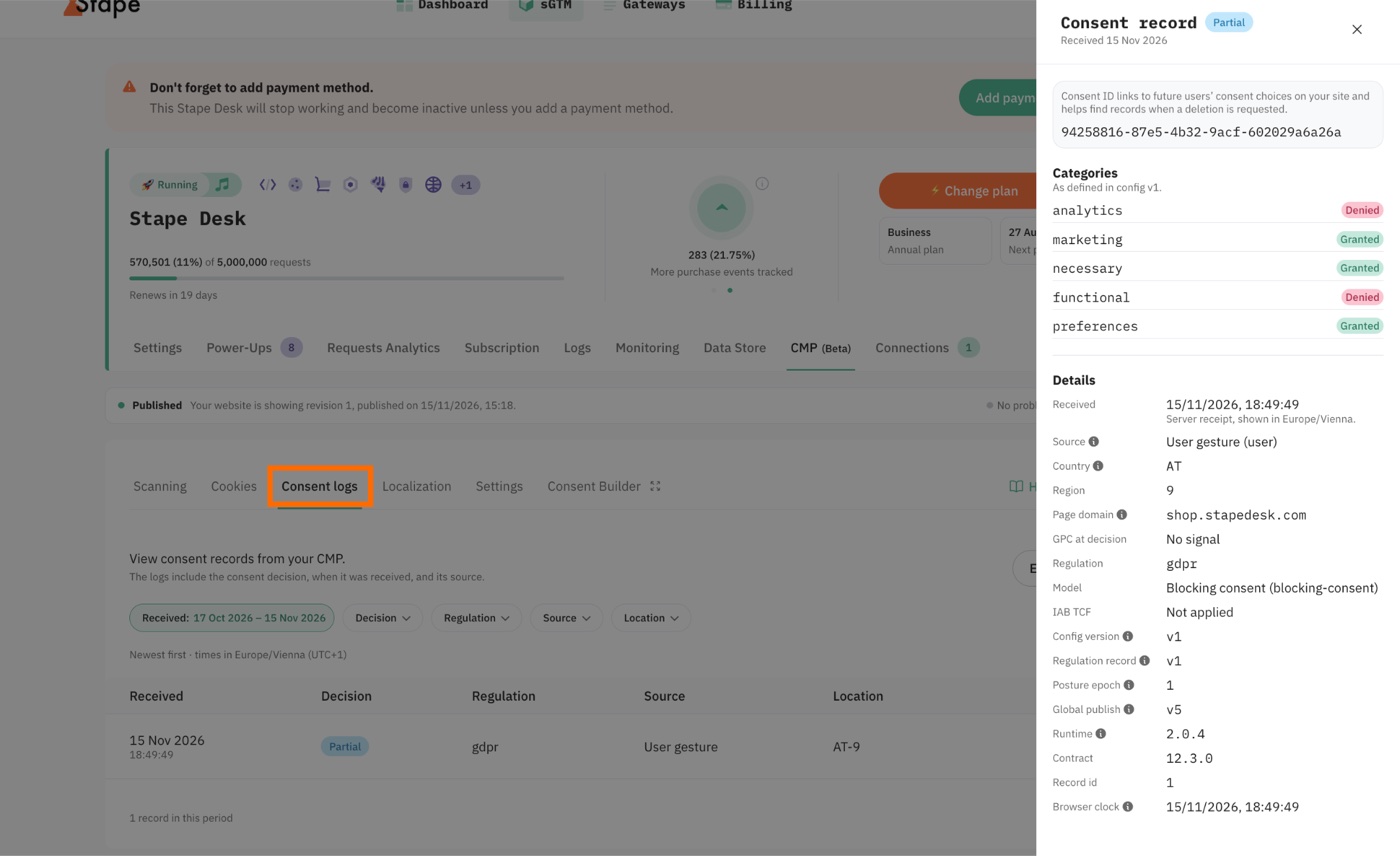 Step 8: Verify cross-container consent parity in sGTM Preview and inspect 3-year Consent logs in Stape CMP
Interactive Workbench 1: Shopify Stape CMP 7-Step Anti-Deadlock Checklist & 3-Layer Debug Console
Check off each step below to validate store readiness, and switch to the "3-Layer Debug Commands" tab to copy checkout sandbox verification commands:
4. Essential Billing Guide: Stape CMP Free Tier Allowance & Complete 8-Tier Pricing Breakdown
Unlike standalone CMP vendors (such as Cookiebot, OneTrust, or Pandectes) that charge $15–$50+/month per domain or per impression tier, Stape CMP uses an all-in-one model: zero separate software license fee, bundled directly into your sGTM monthly request quota. All figures and pause rules below are verified against Stape's official pricing and billing documentation (2026 edition):
4.1 What Does the Free Tier Include & How Much Traffic Does It Cover?
- All Three Core Components Start at
$0:- Stape CMP itself: No separate CMP license fee on any tier (including Free), with full GDPR/CCPA templates, Cookie Scanner, and 3-year Consent Logs retention included;
- Official
Stape Conversion TrackingShopify App: Free to install on the Shopify App Store; - Stape
FreeHosting Plan:$0/month(no credit card required), allowing up to5free sGTM containers per account, each with10,000 Requests/monthplus Custom Loader (mandatory for CMP), Global CDN, and Anonymizer.
- How Does CMP Consume Your Request Quota?
- Per Stape's official How Stape’s CMP usage is billed documentation: every time a visitor's browser loads the Stape CMP script, it counts as
1Stape Request—importantly, loading the script counts+1Request regardless of whether the user clicks "Accept," "Reject," or ignores the banner; - CMP script requests share the exact same monthly request pool as your existing sGTM tracking hits (GA4 page views, add-to-carts, purchases, webhooks, etc.).
- Per Stape's official How Stape’s CMP usage is billed documentation: every time a visitor's browser loads the Stape CMP script, it counts as
- Realistic Traffic Capacity of the Free Allowance:
- Assuming an average shopper views
3pages and fires both GA4 and Meta server hits, a single session typically consumes6–9requests. That puts10,000 Requests/monthat roughly1,100–1,600monthly visitor sessions (while lacking debug logs and Cookie Keeper on Free). It is ideal for Shopify dev/staging stores, pre-launch soft rollouts, or early stores with 30–50 daily visitors; once you run paid traffic, plan to upgrade to a paid tier.
- Assuming an average shopper views
4.2 ⚠️ Critical Billing Warning: Free vs. Paid Overlimit Pause Logic
Stape's official Request limits and pause logic documentation (updated September 2026) enforces radically different suspension rules between Free and Paid containers:
- 🚨
FreePlan Overlimit Rule (Permanently Disabled, Does NOT Auto-Reset Next Month): As long as you stay under10,000, the Free allowance refreshes monthly. However, once a Free container hits 100% of its limit, the container and CMP are permanently Disabled—and they do NOT automatically reset when the next billing cycle begins! The only way to restore tracking is to upgrade to a paid plan. Pro/Pro+Overlimit Rule (Immediate Pause at 110%): No grace period; containers pause immediately upon reaching 110% of monthly quota and remain paused until you upgrade or the next billing cycle resets status toRunning.Business& Higher Tiers (One-Time 30-Day First-Overlimit Grace Period): FromBusinessthroughEnterprise+, each container receives a one-time, lifetime 30-day first-overlimit grace period (so a sudden BFCM traffic spike past 110% keeps running uninterrupted for 30 days without dropping orders). Subsequent overages after that grace period follow the 110% pause rule.- Best Practice Against Downtime: Any live commercial store running paid media should enable
Upgrade container to the next tier automatically(Auto-upgrade) under the container'sSubscriptiontab so traffic spikes scale smoothly without losing tracking.
4.3 Complete 8-Tier Stape sGTM + CMP Pricing Table (USD)
Note: Rates below reflect standard per-container pricing (annual billing saves roughly
20%). Standalone gateway products (such as dedicated Meta CAPI Gateway / Stape Gateway) carry a 7-day trial and bill per pixel or domain (Ultimate/Unlimited), whereas full-stack Shopify + Google Consent Mode v2 + CMP deployments use the Server-side GTM hosting tiers below:
| Plan Tier | Monthly Request Limit (Shared sGTM + CMP) | Monthly Billing | Annual Billing (~20% Off) | White-Label (Remove Stape Logo) | Overlimit Rule & Key Unlocked Capabilities |
|---|---|---|---|---|---|
Free | 10,000 Requests/mo | $0 | $0 | ❌ No | No card required, up to 5 containers; includes Custom Loader, CDN, CMP, 3-yr logs; permanently disabled on exhaustion with no auto-reset |
Pro | 500,000 Requests/mo | $20/mo | $17/mo | ❌ No | Unlocks 3-day debug logs, Cookie Keeper (standard), Bot filtering, AdBlock detection, Data Store, POAS & 24/7 support; pauses at 110% |
Pro+ | 2,000,000 Requests/mo | $50/mo | ~20% annual discount | ❌ No | All Pro features expanded to 2M requests/mo (fits growing stores at 200K–350K monthly sessions); pauses at 110% |
Business | 5,000,000 Requests/mo | $100/mo | $83/mo | ✅ Unlocked | Unlocks CMP white-labeling (hide Stape mascot/logo), 10-day logs, custom Cookie Keeper, ≤20 domains, multi-region clusters, Monitoring & File Proxy; 30-day first-overlimit grace period |
Business+ | 10,000,000 Requests/mo | $150/mo | ~20% annual discount | ✅ Yes | All Business features expanded to 10M requests/mo; includes 30-day first-overlimit grace period |
Enterprise | 20,000,000 Requests/mo | $200/mo | $167/mo | ✅ Yes | Unlocks S3/GCS automated log export, ≤50 domains, dedicated Account Manager & phone support; 30-day first-overlimit grace period |
Enterprise+ | 50,000,000 Requests/mo | $300/mo | ~20% annual discount | ✅ Yes | All Enterprise features expanded to 50M requests/mo |
Custom | Unlimited / Custom | Custom Quote | Custom Quote | ✅ Yes | Dedicated IP, private clusters, custom DPA/SSA/HIPAA BAA, SSO & no-pause SLA |
Interactive Workbench 2: Stape CMP Free Tier & 8-Tier Request Cost Estimator
Adjust the sliders for your store's monthly sessions, average pages per session, and active ad channels to calculate total monthly CMP + sGTM request volume, check $0 Free tier eligibility, and identify the optimal plan:
5. Practical FAQ & Companion Tools
Q1: I already pay for a standalone CMP (e.g., Cookiebot). Is switching to Stape CMP worth it?
If your stack already hosts sGTM on Stape, switching to Stape CMP immediately saves $180–$600/year in third-party per-domain fees. More importantly, delivering the CMP script via Custom Loader on your first-party domain prevents iOS and browser content blockers from stripping it—while keeping Shopify Customer Privacy API and Google Consent Mode v2 natively synced by Stape.
Q2: If every page load counts as 1 Request, won't it burn through my quota quickly?
Three practical quota-saving moves: (1) Always enable Hide the consent banner from bots in Settings and set bot default consent to Denied, cutting 15%–25% of wasted crawler requests; (2) configure Stay silent for visitors outside regulated regions (EU/UK/CA, etc.) where legally appropriate; (3) use the estimator above to leave a 25% traffic buffer and enable Auto-upgrade on live commercial containers before peak sales.
Q3: If docs/tools reference MCP, is Shopify's cookie banner CMP or MCP?
Stape also offers a separate Model Context Protocol (MCP) integration for AI developer workflows, which sometimes causes acronym confusion. Everything covered in this guide—Shopify's cookie consent banner, Customer Privacy API sync, and Google Consent Mode v2—is strictly CMP (Consent Management Platform).
Q4: Recommended Companion Tools & Guides
- Shopify GTM / GA4 Custom Web Pixel Generator: Generate Checkout Extensibility-compliant add-to-cart and purchase pixel code designed to work alongside Stape CMP;
- Shopify Session Measurement Update & CVR Impact Guide: Understand how Shopify's 30-minute session rules, bot filtering, and Consent Mode affect reported conversion rates;
- UTM Builder Pro Multi-Channel Attribution Workbench: Keep Meta, Google, and TikTok UTM parameters clean and prevent
Unassignedtraffic once privacy consent gates are active; - Shopify 18-Month Store Activity Log Security Audit Guide: Track every team member or third-party app change to privacy settings and store scripts;
- Knowledge Base: Browser Fingerprinting, WebRTC & DNS Leak Guide: Deep dive into browser privacy mechanics and multi-account operational security boundaries.
Sources: Implementation steps, UI screenshots, and billing rules verified against EVAOO News, How to set up Stape CMP, How Stape's CMP usage is billed, Stape Pricing, and Request limits and pause logic.
Found this actionable? Copy standard citation & summary
Formatted with canonical attribution link and executive summary—ready for Slack, Notion, or LLM context.
Put Into Practice: Companion Browser Workbenches
Shopify GTM & GA4 Web Pixel Generator
Generate production-ready Shopify Customer Events Web Pixel code for GA4, Meta, and TikTok.
UTM Builder Pro Matrix Workspace
Reverse URL parser, GA4 channel group diagnostics, and dynamic ad macro batch CSV export.