
How to Track ChatGPT Product Referrals in GA4: Filtering chatgpt.com / feed, Product URL Drill-Downs & Mobile vs. Web Analysis
 How to Track ChatGPT Product Referrals in GA4
Instead of clicking through page after page of traditional search results, growing numbers of shoppers now open ChatGPT directly for product recommendations and head-to-head comparisons. Unlike general informational Q&A, ChatGPT's shopping recommendation cards display product names, live pricing, key features, candid downsides, and direct outbound purchase links to ecommerce storefronts and retailers.
Even more important for ecommerce growth and attribution teams: ChatGPT automatically injects a dedicated UTM query string—
utm_source=chatgpt.com&utm_medium=feed—onto these product recommendation links. With a 3-minute setup in Google Analytics 4 (GA4) using filters and device comparisons, you can see exactly which SKUs AI is actively recommending for free and uncover hidden conversion friction on your product detail pages (PDPs) by comparing Mobile vs. Web dwell times.
1. What Do ChatGPT Product Recommendation Links Look Like? Look for utm_source=chatgpt.com&utm_medium=feed
Consider a typical product-discovery prompt such as "Best running headphones in 2026." Inside the My top recommendations block, ChatGPT surfaces high-density decision cards:
- Use-case badges and live pricing: For instance, labeling Shokz OpenRun Pro 2 as Best for outdoor running (
$179.00) and Beats Powerbeats Pro 2 at$239.99. - Structured highlights and candid downsides: Listing open-ear safety for outdoor runs, 12-hour battery life, and IP55 sweat/water resistance—or secure earhooks, ANC, and heart-rate monitoring—alongside transparent trade-offs such as reduced bass in noisy environments or charging-case bulk.
- Standardized outbound UTM parameters: Whenever a shopper clicks a product title or purchase button to visit your ecommerce storefront, the landing URL automatically carries:
| 1 | utm_source=chatgpt.com&utm_medium=feed |
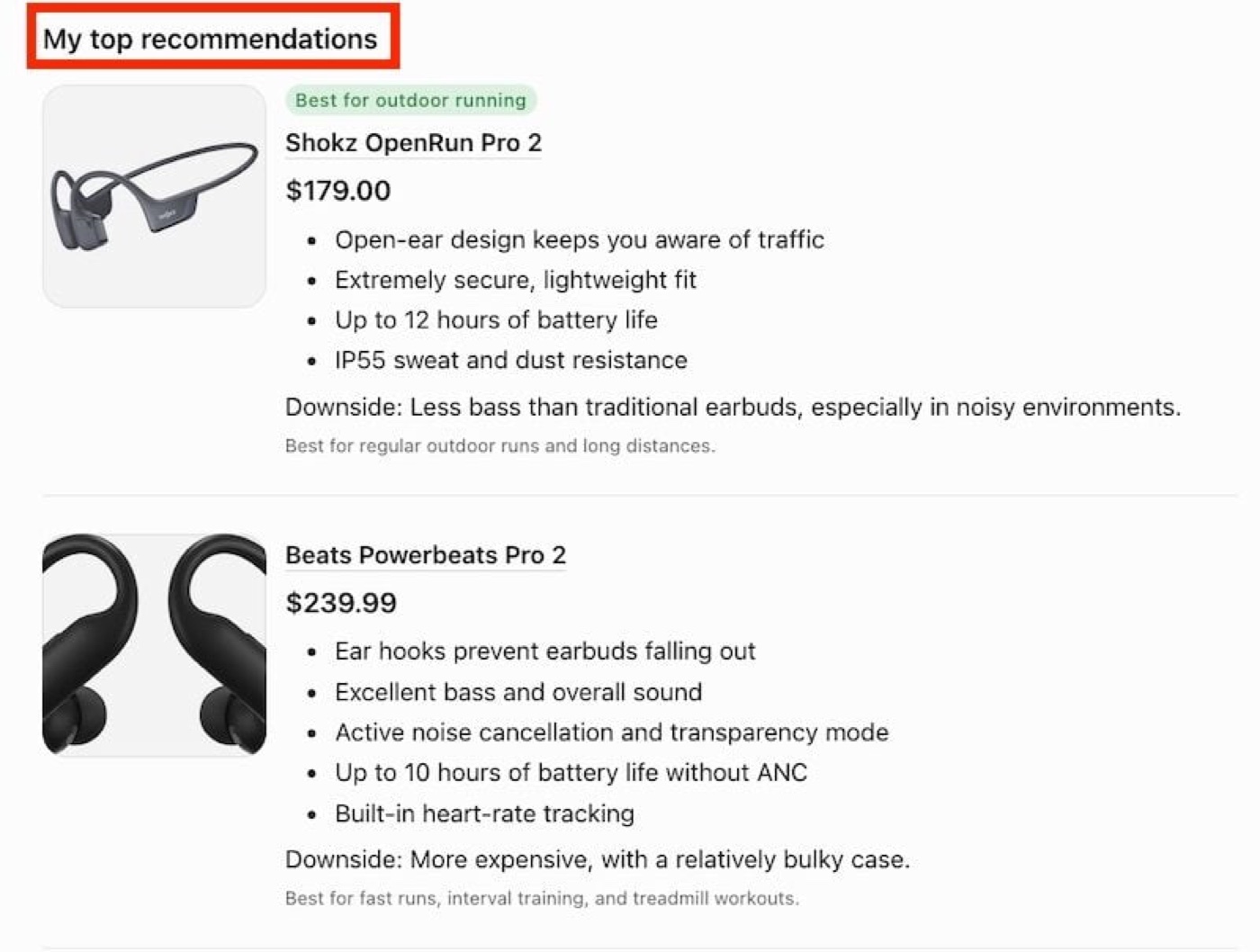 Example ChatGPT Product Recommendation Cards for the Prompt "Best running headphones in 2026"
Attribution Pitfall: Why You Often Miss It in GA4 Default Channel Groups
When auditing traffic, many ecommerce operators check only GA4's Session default channel group and mistakenly conclude their store receives zero AI shopping referrals. Two mechanics explain why this happens:
- Silently bucketed under
Unassigned: GA4's built-in Default Channel Grouping rules do not maputm_medium=feedto Organic Search or Organic Shopping. Unless you configure custom channel definitions, these high-intent product card clicks are hidden inside theUnassignedbucket. - Intent split vs. standard footnote citations: When ChatGPT cites a blog article as a footnote in a general answer, it typically sends
utm_source=chatgpt.comalone (appearing in GA4 aschatgpt.com / (not set)orchatgpt.com / referral). Only sessions carryingchatgpt.com / feedindicate a shopper clicked your product directly from a dedicated shopping recommendation flow.
Interactive Tool: ChatGPT Outbound Link Parameter Dissector & One-Click GA4 Filter Copier
Switch between Product Recommendation Cards (feed), General Chat Citations, and Cross-Platform AI Shopping Regex patterns below, and copy exact filter strings for GA4 in one click:
2. Step-by-Step 5-Part Walkthrough: Separating Per-Product Traffic and Device Comparisons in GA4
Ecommerce teams do not need to modify any frontend tracking code. Follow these steps inside Google Analytics 4 to pull your complete ChatGPT product referral report:
Step 1: Open GA4 Traffic Acquisition and Filter Sessions by chatgpt.com / feed
- Sign in to Google Analytics 4 (GA4).
- In the left navigation, go to
Reports>Life cycle>Acquisition>Traffic acquisition. - Click
Add filterat the top of the report, then chooseDimension>Traffic source>Session source / medium. - Set
Match Typetocontains, enterchatgpt.com / feedunderValue, and clickApply(alternatively, switch the table's primary dimension toSession source/mediumand typechatgpt.com / feedinto the table search bar).
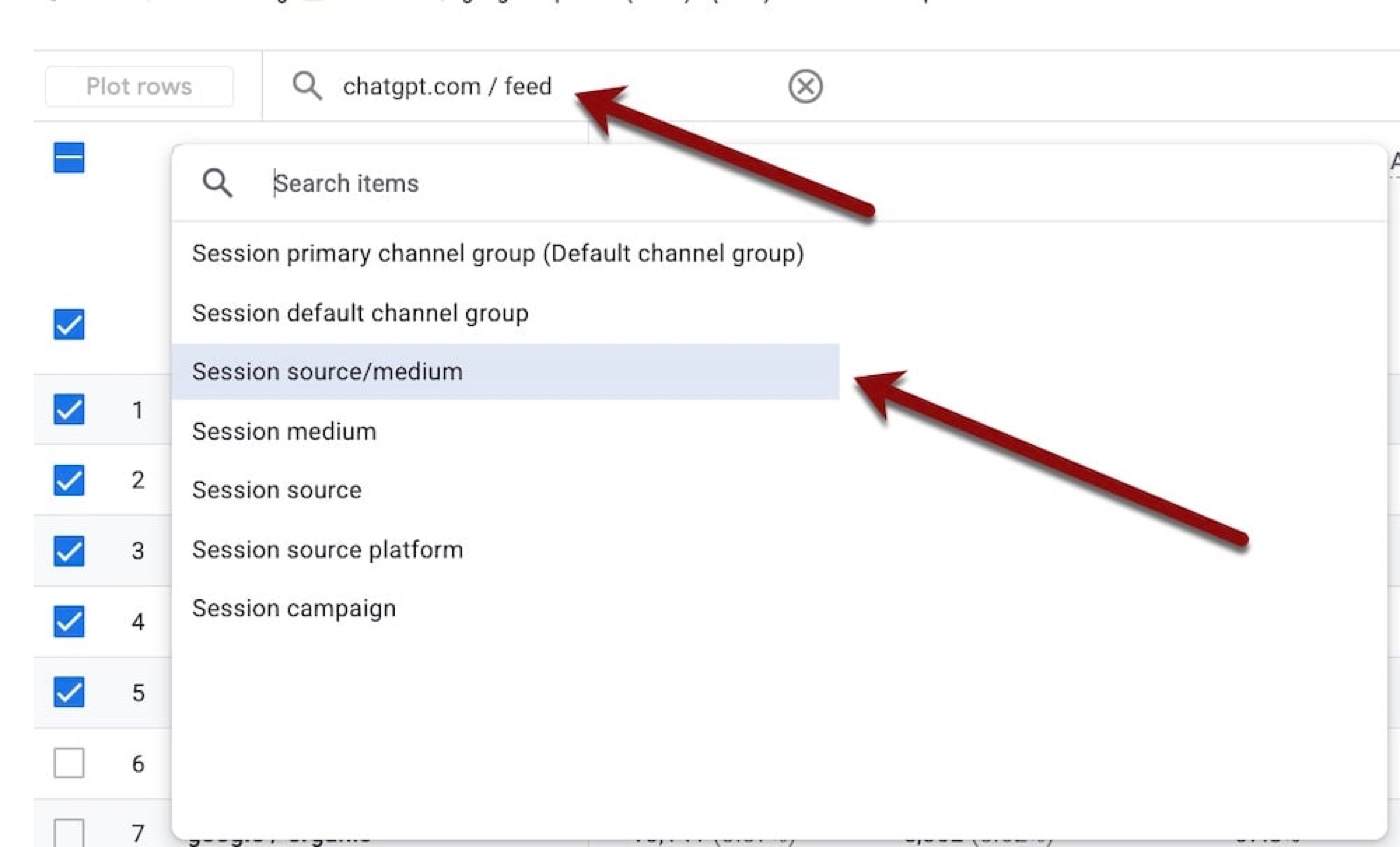 Step 1: Filtering Session source/medium for chatgpt.com / feed in GA4 Traffic Acquisition
Step 2: Add Page path and screen class as a Secondary Dimension to Pinpoint Recommended Product URLs
Aggregate session totals alone will not tell you which SKUs to optimize. Next, drill down to individual product landing URLs:
- Next to the primary dimension dropdown (
Session source/medium) above the data table, click the blue+icon to add a secondary dimension. - Expand
Page / screenand selectPage path and screen class.
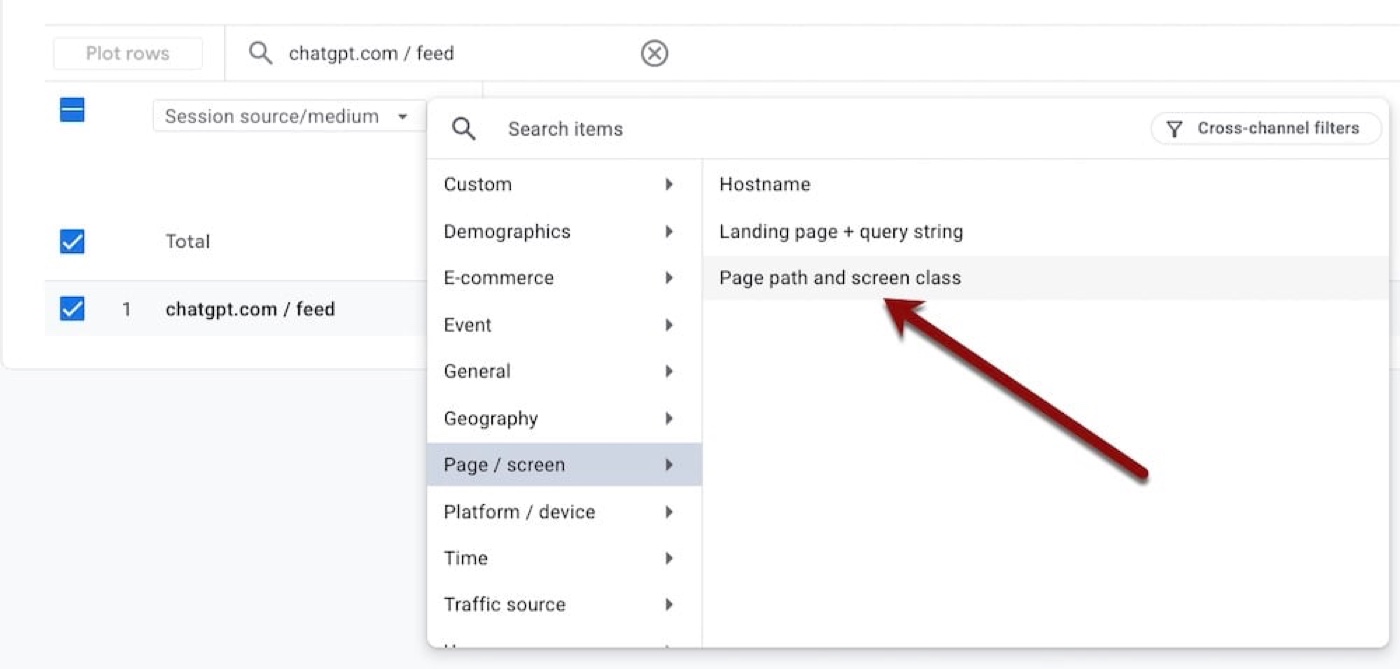 Step 2: Clicking + to Expand Page / screen and Add Page path and screen class Secondary Dimension
Step 3: Inspect Per-Product Landing Page (/products/...) Traffic Volume and Engagement Premium
Once the secondary dimension is active, GA4 lists every /products/... URL receiving ChatGPT shopping card clicks alongside its engagement metrics.
The real merchant dataset below illustrates a striking pattern:
- Even though
chatgpt.com / feeddelivered 250 sessions (0.08%of total site traffic), 116 were engaged sessions—yielding an overall Engagement rate of46.4%, which is+33.96%higher than the sitewide average. - Traffic concentrates heavily on hero SKUs: the #1 product captured
69sessions (27.6%of the channel) with a60.87%engagement rate. Because shoppers already pre-screened price and specs inside ChatGPT before clicking, their purchase intent is substantially higher than broad traffic.
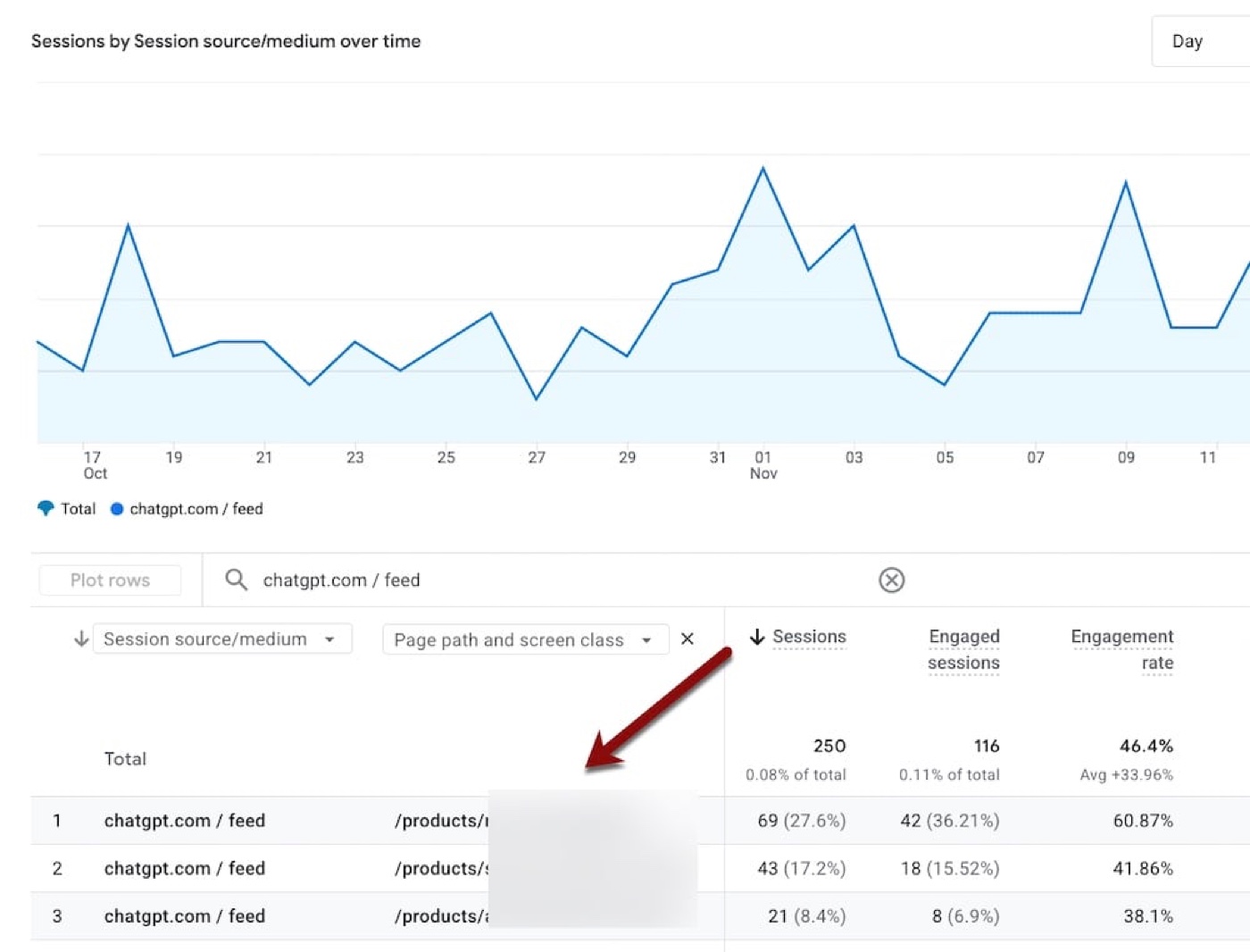 Step 3: Inspecting 250 chatgpt.com / feed Sessions Over Time and Per-Product Engagement Rates
Step 4: Add a Mobile traffic vs. Web traffic Comparison (Critical!)
Why isolate Mobile vs. Web behavior? Because the vast majority of consumers prompt ChatGPT inside its mobile app, meaning outbound clicks open your product page inside a mobile browser or in-app webview.
Enable a side-by-side comparison in three clicks:
- Click
Add comparison +at the top of the report. - Check
Mobile trafficandWeb traffic. - Uncheck the default
All userssegment and click Apply.
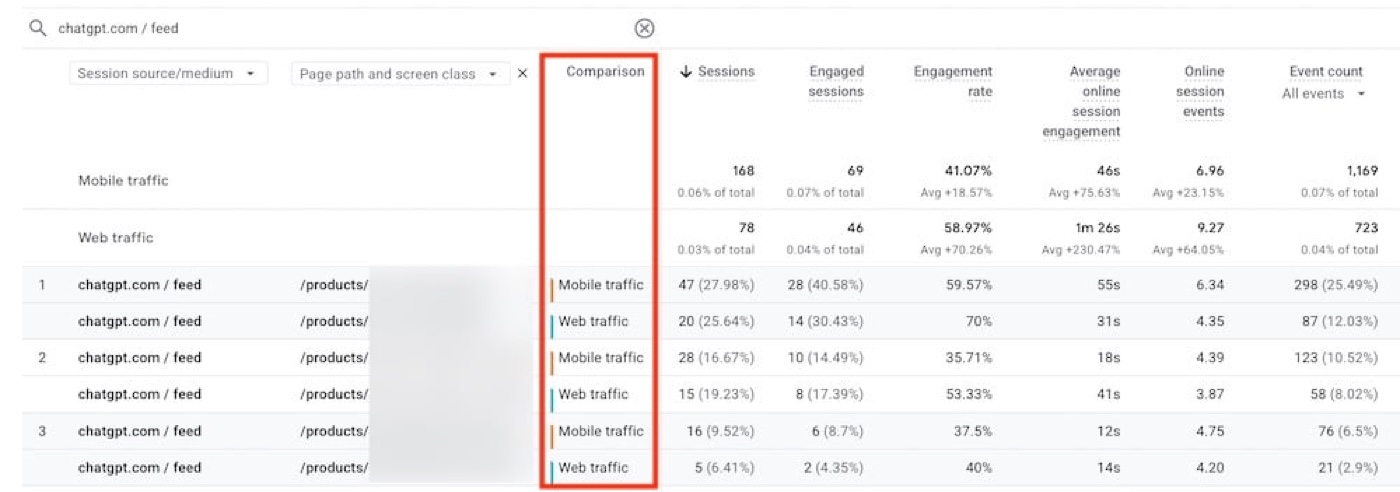 Step 4: Comparing Mobile traffic (168 sessions) vs. Web traffic (78 sessions) for chatgpt.com / feed
The split dataset reveals stark cross-device differences:
- 70/30 traffic split:
Mobile trafficaccounts for168sessions (~68.3%), more than 2.15x the78sessions (~31.7%) fromWeb traffic—confirming mobile ChatGPT App usage is the primary storefront entry point. - Sharp engagement gap: While mobile brings more volume (
41.07%engagement rate,46saverage engagement time), desktopWeb traffichits a58.97%engagement rate (+70.26%vs. site average) and an impressive1m 26saverage engagement time (+230.47%vs. site average) with9.27events per session. - Spot mobile "leaky" PDPs: Look at the second product row—desktop visitors engage at
53.33%(41sdwell time), whereas mobile's28sessions drop to35.71%engagement and just18saverage dwell time; the third product drops to12son mobile. Such steep device gaps pinpoint prime CRO opportunities.
Interactive Sandbox: Simulate GA4 Secondary Dimension Drill-Downs & Per-SKU Prompt Diagnostics
Toggle the simulated secondary dimension, switch Mobile vs. Web comparisons, and click product URLs below to inspect SKU-level diagnostic recommendations:
3. How to Monetize the Data: 3 Growth Actions Every Ecommerce Team Should Take
Once your custom GA4 view for utm_source=chatgpt.com&utm_medium=feed is in place, growth, SEO/GEO, and CRO teams should run these three weekly optimization loops:
1. For Top-Traffic Hero Products: Reverse-Engineer Buyer Prompts and Audit AI Response Accuracy
- Pull the top 5 product detail pages by
chatgpt.com / feedsessions and infer the buyer prompts most likely generating those recommendations based on core attributes (audience, price tier, waterproofing, battery life, or use case). - Test those prompts directly in ChatGPT and verify that the AI's cited retail price, promotional stock status, technical specs, and
Downsidecallouts are accurate and up to date. - If ChatGPT quotes outdated prices, discontinued variants, or wrong specs, update your above-the-fold PDP spec tables and
Product/OfferJSON-LD structured data immediately, and keep live product feeds synchronized via our Businesses in ChatGPT & Shopify Agentic Commerce Hub.
2. For High-Impression, Low-Engagement or Low-Converting Landing Pages: Run Cross-Device Tests to Remove Friction
- Flag SKUs already winning ChatGPT referral clicks whose
Engagement ratelags or whose mobile dwell time falls under 20 seconds (like the18sand12sexamples above). - Test every flagged URL on both desktop and mobile—specifically simulating clicks out of the ChatGPT mobile app webview:
- Does a full-screen email popup or spin-the-wheel modal block the screen upon arrival?
- Are the exact selling points that persuaded the shopper in ChatGPT (such as IP55 rating, sizing guidance, or return policy) buried below the fold on mobile?
- Do mobile size/color variant selectors or Apple Pay / Shop Pay express checkout buttons suffer from script errors or sticky-bar overlap?
3. Learn from Your Top Benchmark Pages: Extract High-Citation PDP DNA Across the Catalog
- Audit your Top 1–3 ChatGPT-referred PDPs: why does ChatGPT consistently select these pages over others?
- First check their organic rankings in Google and Bing—empirical evidence shows PDPs with strong traditional search rankings and authority are far more likely to be retrieved and cited in ChatGPT shopping cards (pair this with our GEO Generative Engine Optimization Playbook Hub to improve AI citability).
- Break down the four content pillars on winning pages—concrete product descriptions, clear use-case scenarios, information-dense customer reviews, and targeted FAQs—and roll that template out across higher-margin core SKUs.
4. Frequently Asked Questions (FAQ)
Q1: What is the difference between chatgpt.com / feed and chatgpt.com / referral?
chatgpt.com / feed (from utm_source=chatgpt.com&utm_medium=feed) specifically identifies clicks from ChatGPT's structured product recommendation cards and shopping links, carrying high purchase intent. Standard footnote citations in general Q&A responses usually carry only utm_source=chatgpt.com, appearing in GA4 as chatgpt.com / (not set) or chatgpt.com / referral and reflecting informational discovery rather than direct shopping cards.
Q2: How do I save this report permanently in GA4 without reconfiguring filters every time?
Open Explore in the left GA4 menu and create a Free form exploration: drag Session source / medium and Page path and screen class into Rows, drag Device category (mobile / desktop / tablet) into Columns, add a filter for Session source / medium contains chatgpt.com / feed, and include Sessions, Engagement rate, Add to carts, Ecommerce purchases, and Purchase revenue as Values for permanent one-click reuse.
Q3: What other foundational tracking and attribution tools should an ecommerce store pair with this workflow?
Review these three foundational workflows alongside your ChatGPT tracking setup:
- Standardize campaign links with the UTM Builder Pro Multi-Channel Matrix and GA4 Default Channel Grouping Regex Guide to keep Unassigned traffic under
2.0%; - For Shopify stores, use the Shopify GTM / GA4 Custom Web Pixel Generator to ensure Checkout Extensibility sandbox checkout conversions are passed back to GA4 100% accurately;
- Cross-check storefront order attribution against GA4 session counts with the Shopify 46 Official Session & Attribution Fields Reference.
Sources: Compiled from EVAOO News Intelligence and the Practical Ecommerce article "Track ChatGPT Product Referrals in GA4" by Ann Smarty.
Found this actionable? Copy standard citation & summary
Formatted with canonical attribution link and executive summary—ready for Slack, Notion, or LLM context.
Put Into Practice: Companion Browser Workbenches
Shopify GTM & GA4 Web Pixel Generator
Generate production-ready Shopify Customer Events Web Pixel code for GA4, Meta, and TikTok.
UTM Builder Pro Matrix Workspace
Reverse URL parser, GA4 channel group diagnostics, and dynamic ad macro batch CSV export.