
Meta Localized Business Verification with Alipay (China): Complete WhatsApp Manager Walkthrough & FAQ

Key Compliance Update: According to Meta for Developers documentation (updated Nov 11, 2026), Meta is running a limited test of Alipay localized business verification inside WhatsApp Manager for Mainland China businesses. Eligible accounts assigned to the test group can complete official Business Verification—one of the primary scaling paths to raise WhatsApp messaging limits—within minutes instead of days, with zero document uploads and no API integration required.
1. What Is Localized Business Verification? Availability & Test Mechanics
Localized business verification lets businesses registered in supported countries and regions clear Meta's business verification requirement through a trusted local identity provider instead of uploading paperwork and waiting for manual review.
| Official Spec | Mainland China Rollout Status |
|---|---|
| Country or Region | Mainland China |
| Verification Provider | Alipay |
| Surface | WhatsApp Manager UI (no public API endpoint) |
| Availability | Limited test (subject to change or termination at any time) |
| Compliance Weight | Counts fully as Business Verification toward scaling messaging limits |
| Fee | Free (no Meta or Alipay verification charge) |
Two critical rules govern how the rollout behaves:
- Randomized A/B Allocation—No Whitelisting: Meta randomly assigns eligible businesses to either a test group or a control group. Only accounts in the test group see the Alipay option in WhatsApp Manager; neither advertisers nor Business Solution Providers (BSPs) can request access or manually move a client into the test group.
- Verifies the Underlying Business Portfolio: Alipay verification verifies the Business Portfolio that owns the WhatsApp Business Account. Note that completing Alipay verification for Meta Ads does not verify a business for WhatsApp.
2. Requirements & Pre-Flight Checklist
A Mainland China business sees and completes Alipay verification only when both visibility gates and operational credentials align.
A. Visibility Conditions (When the Alipay Option Appears)
- The Business Portfolio's country is explicitly set to China;
- The Business Portfolio is not already verified;
- The Business Portfolio has been randomly assigned to Meta's test group.
B. Required Credentials & Permissions to Complete Verification
- 18-Character Unified Social Credit Code: Official business registration number;
- Legal Representative's Full Name & Chinese National ID Number: Must match official Chinese business registry records character-for-character;
- Legal Representative's Personal Phone + Alipay App: The legal representative must personally scan the QR code inside Alipay on their own phone;
- Authorized Business Portfolio Admin: An operator able to manage Business Portfolio settings (such as an Admin with Full Control) to initiate the flow inside WhatsApp Manager.
3. Where Businesses See the Option in WhatsApp Manager
Accounts in the test group can launch Alipay verification from two native WhatsApp Manager screens—or via a direct verification email sent by Meta.
Entry Point 1: Overview Tab > Business Status Card & Restore Banner
Under WhatsApp Manager > Overview, the right-hand Business Status panel displays a Verify your business with Alipay card with a Start verification CTA. If outbound messaging is restricted pending verification, a Restore messaging by using Alipay to verify your business banner also appears across the top of the tab.
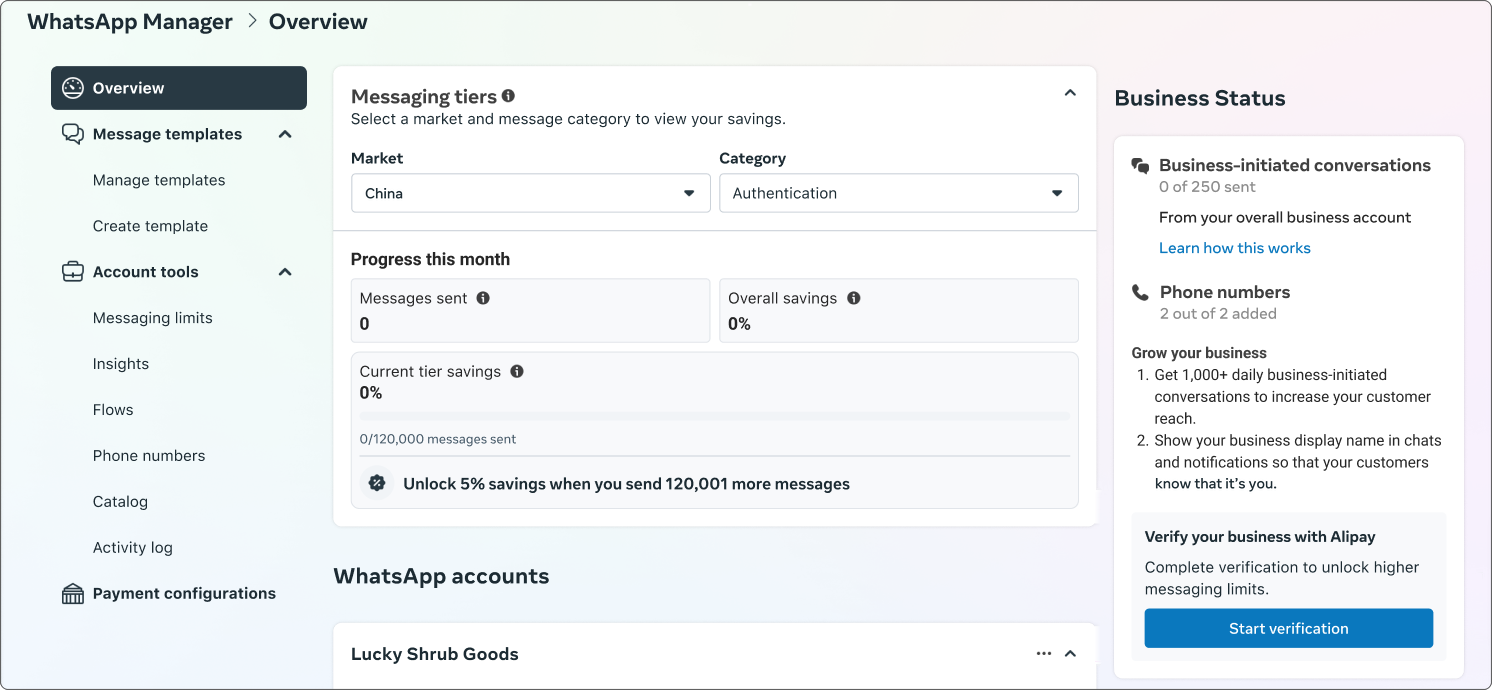 WhatsApp Manager Overview tab highlighting the Verify your business with Alipay card under Business Status
Figure 1: Native Alipay verification card inside the Overview > Business Status panel (Source: Meta for Developers).
Entry Point 2: Account Tools > Messaging Limits Tab
Navigating to Account tools > Messaging limits exposes a prominent Verify your business with Alipay module whenever the Business Portfolio's rolling 24-hour messaging tier remains at 250 conversations—alongside a Verify another way link back to traditional review and the organic volume path (250 unique customers over 7 days + high/medium quality rating) to climb through 2,000 -> 10,000 -> 100,000 messaging limits.
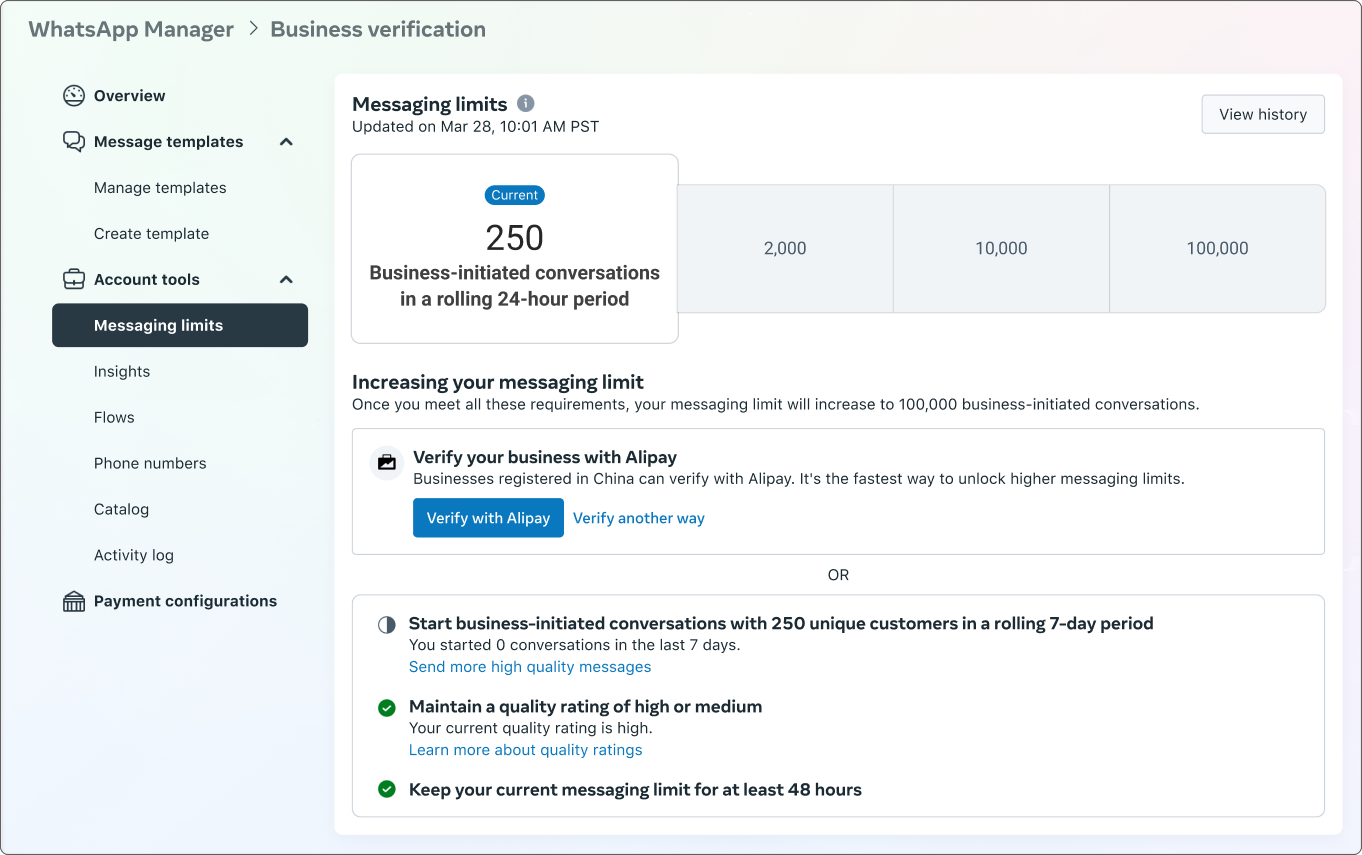 WhatsApp Manager Messaging limits tab showing Verify with Alipay at the 250 tier
Figure 2: Alipay verification card displayed at the 250 messaging tier inside Account tools > Messaging limits (Source: Meta for Developers).
4. Three-Step Alipay Verification Walkthrough
Step 1: Enter Business Registration & Legal Representative Details
Click Start verification on the Overview tab or Verify with Alipay on the Messaging limits tab, then enter:
- Unified Social Credit Code (
18-character code); - Legal representative name;
- Legal representative ID number.
Meta checks these fields in real time against China's official business registry, so an exact character match is mandatory. Select Verify with Alipay to proceed, or select Verify another way at any time to fall back to document-based verification in Security Center.
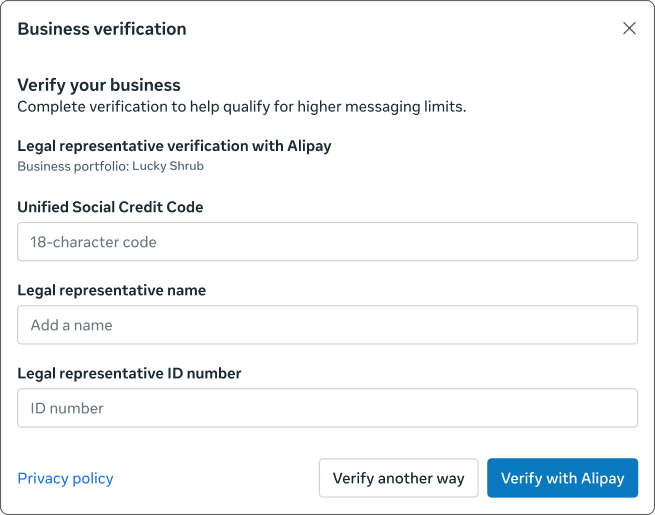 Step 1 modal requesting 18-character Unified Social Credit Code, Legal representative name, and ID number
Figure 3: Step 1 modal checking corporate registration code and legal representative ID against the official registry.
Step 2: Legal Representative Scans QR Code in Alipay (~30 Seconds)
Select Scan to verify to launch an Alipay QR code page in a new browser tab. Have the legal representative open their personal Alipay account on their own phone, scan the code, and complete identity confirmation (estimated at roughly 30 seconds).
Once Alipay confirms identity, WhatsApp Manager reflects the verified status so the operator can proceed. If verification fails, click Back to correct entity details and retry, or pivot to document submission in Security Center.
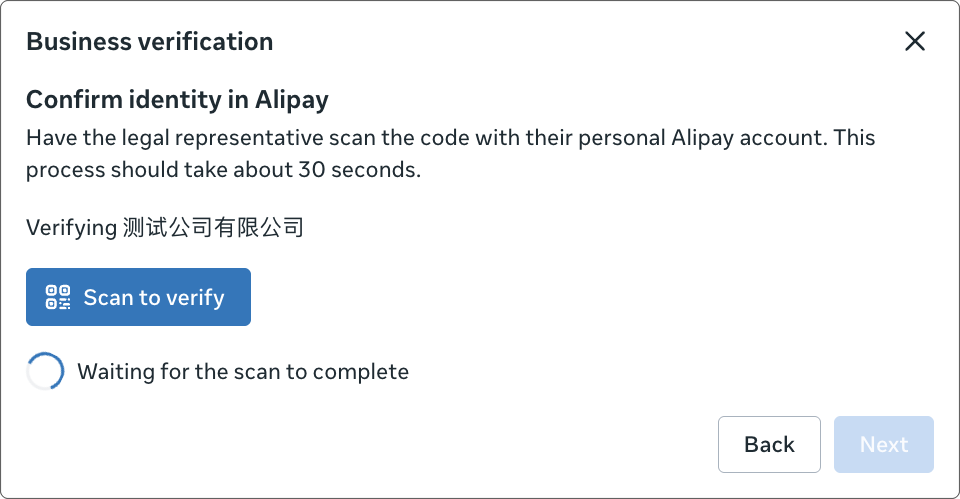 Step 2 modal with Scan to verify button prompting the legal representative to scan via personal Alipay app
Figure 4: Step 2 QR verification prompt showing live polling status while waiting for Alipay confirmation.
Step 3: Verified Confirmation & Automated Tier Upgrade
Upon Alipay confirmation, WhatsApp Manager immediately displays Your business is verified with the verification date. Messaging limits unlock automatically once the underlying WhatsApp account refreshes.
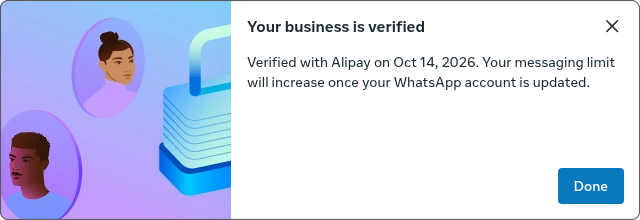 Step 3 modal confirming Your business is verified with Alipay and pending messaging limit increase
Figure 5: Step 3 success confirmation state triggering WhatsApp messaging limit scaling.
5. Official FAQs & Compliance Pitfalls to Avoid
- Does Alipay verification replace document-based business verification?
- No. It serves purely as a faster verification path for eligible test-group accounts in Mainland China. Document-based verification in Security Center remains available globally.
- Why doesn't a Mainland China business see the Alipay option?
- Beyond randomized control group placement, Meta hides the Alipay card whenever: (a) the Business Portfolio country is not set to China, (b) the Business Portfolio is already verified, (c) the signed-in user lacks permission to manage Business Portfolio settings, or (d) on the Messaging limits tab, the account limit is already above 250.
- Can a Solution Partner enable Alipay verification or trigger it via API?
- No. Meta assigns accounts randomly, and there is no Graph API / WhatsApp Business Platform API to activate, start, or automate Alipay verification in WhatsApp Manager.
- My client already completed Alipay verification for Meta Ads. Do they still need to verify here?
- Yes. Alipay verification completed for Meta Ads does not verify the business for WhatsApp.
- Does Alipay verification cost anything?
- No. Neither Meta nor Alipay charges a fee for this flow.
- What exact data is shared with Alipay?
- Meta collects and shares only the Unified Social Credit Code and the legal representative's full name and national ID number with Alipay to run the match; biometric/account confirmation takes place entirely inside Alipay under the Meta Privacy Policy.
6. Operational Takeaways for Global Merchants & BSPs
- Audit Business Portfolio Country & Admin Roles Early: Ensure cross-border merchants operating Mainland China legal entities do not accidentally nest their WhatsApp accounts under a legacy Hong Kong or US Business Portfolio if they hope to qualify for instant Alipay checks, and verify an admin with Full Control is available alongside the legal representative.
- Keep Traditional Security Center Paperwork Ready: Because Alipay verification remains a limited test subject to randomized holdouts or unannounced deprecation, always retain clean business license scans and domain verification backups so campaign launches are never blocked at the 250-conversation cap. Before rolling out WhatsApp click-to-chat or marketing campaigns to DTC landing pages, verify metadata integrity with the EVaoo OG & Meta Preview Tool and review related EVaoo Digital Marketing Guides.
Official Documentation Reference: Meta for Developers — Localized business verification
Found this actionable? Copy standard citation & summary
Formatted with canonical attribution link and executive summary—ready for Slack, Notion, or LLM context.
Put Into Practice: Companion Browser Workbenches
UTM Builder Pro Matrix Workspace
Reverse URL parser, GA4 channel group diagnostics, and dynamic ad macro batch CSV export.
Shopify GTM & GA4 Web Pixel Generator
Generate production-ready Shopify Customer Events Web Pixel code for GA4, Meta, and TikTok.