OpenAI 突然发布了 GPT-Image 2.5。
官方一上来就给了几个很猛的升级:生成延迟最高降低 50%,局部编辑更准,连续修改不容易把前面的细节弄丢,还加入了 Sketch 手绘、图片批注和模板。OpenAI 同时公布,ChatGPT Images 与 API 图像模型每周已经生成超过 30 亿张图片。
看完发布页,我第一反应是:以前生图最难受的几个问题,它解决了吗?连续修改之后发生漂移是否解决?生图速度是否提升?修改指令是否可以准确完成?那就来看看,这次 GPT-Image 2.5 到底怎么个事。
01.Two New Models: Flare and Sunburst
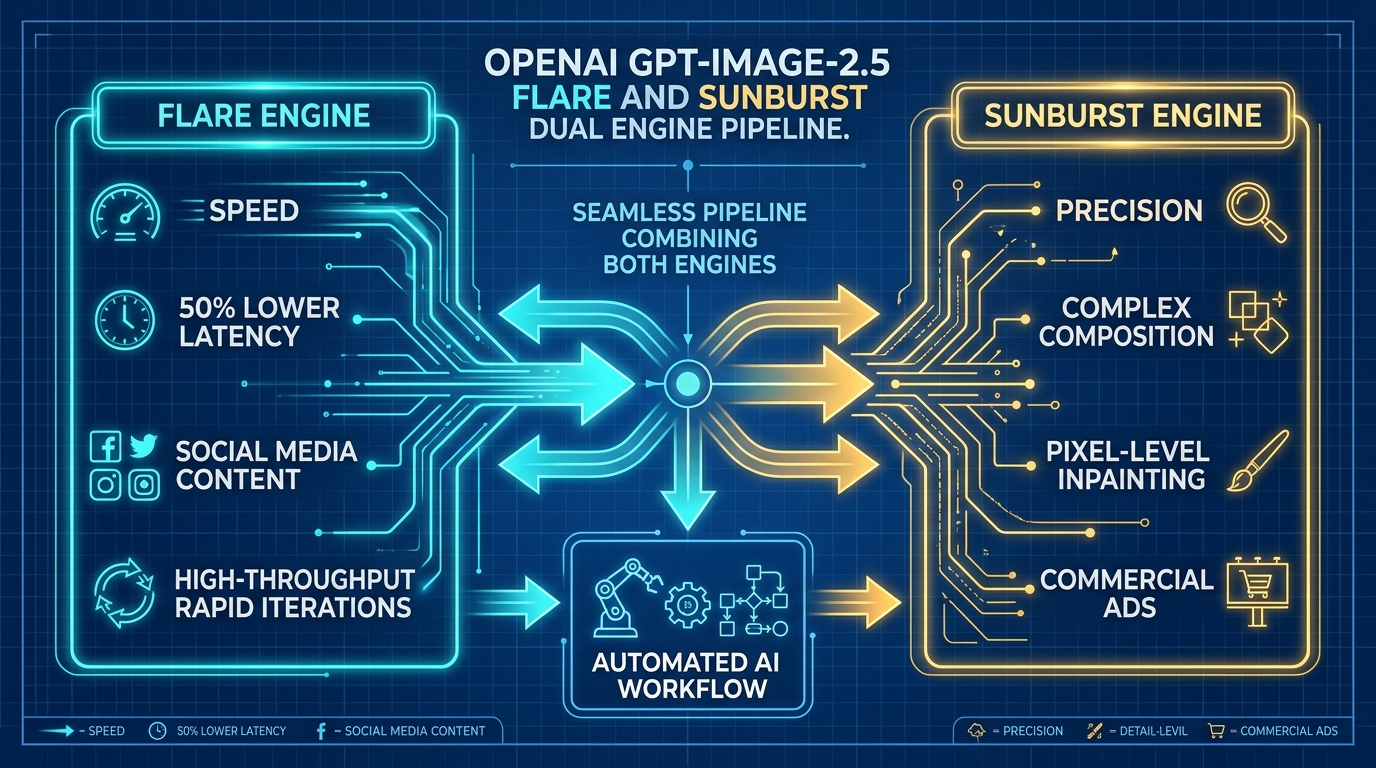
OpenAI 这次发布了两款新模型:GPT-Image-2.5 Flare 和 GPT-Image-2.5 Sunburst。官方给它们的定位很清楚:
速度更快,主打日常高质量生图。适合社媒配图、批量出图、AI Agent 自动化流水线和快速做方案。生成延迟相比上一代降低约 50%。
能力更强,主打生成和精细编辑。适合商品图、广告成片,以及需要反复修改、多轮微调的任务。
这里要分清网页端和 API:
- ChatGPT 网页版:在图片功能里,不需要、也看不到让你手动选择 Flare 或 Sunburst 的开关。当前界面只提供质量档等选项,具体调用由 ChatGPT 自动处理;本文后面的网页实测也统一标为
ChatGPT Images 2.5,不把某一张结果硬归到其中一款模型。 - API 开发者调用:才需要在两个模型之间做选择:追求速度、批量出图和日常配图,可以先用 Flare;更看重复杂生成、局部修改和多轮编辑精度,再选 Sunburst。两款模型的官方 token 单价相同,差别主要在速度和处理复杂任务的能力。
02.Deconstructing the Upgrade into 4 Core Pillars
OpenAI 公布的数据很夸张:ChatGPT Images 与 API 图像模型每周合计生成超过 30 亿张图片。在这个体量上,2.5 把延迟、编辑和输入方式一起动了:

1. 更快:相对 Images 2.0,生成延迟最高降低 50%
这是官方的上限数据,不等于每张图都会快一倍。尺寸、质量档、地区、服务器负载和是否编辑图片,都会影响等待时间。本文暂时不拿网页端等待时间做速度结论。没有逐轮计时,也无法排除网络和排队影响,所以这里只保留官方公布的「最高降低 50%」。
2. 更稳:让没被点名的内容少动一点
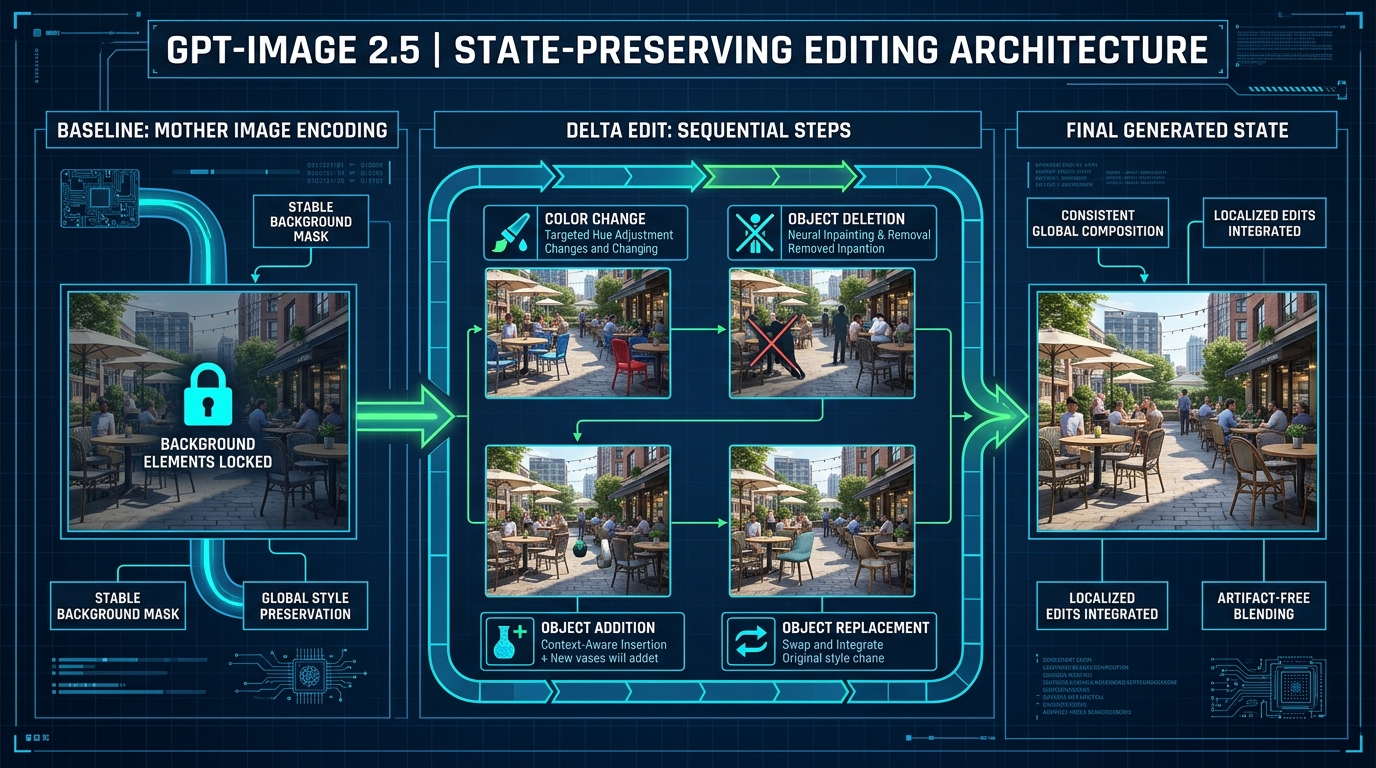
图像编辑最烦的地方,一直是改文字,改背景,改人脸,改小细节。2.5 的重点之一,就是在修改单个物体、背景或文字时,尽量保住主体、构图和品牌视觉。官方还专门强调了多轮编辑:后一轮应该沿用前几轮的修改,减少越改越糊、越改越偏。
3. 更像设计工具:草图、批注、模板、Prompt 分享
ChatGPT 新增了几个更接近设计工具的入口:
- 点击输入框左侧的
+,选择「绘图」,打开草图编辑器,再让模型按布局生成图片; - 从图片卡片的「编辑」入口继续修改;官方还提到图片批注,可在指定位置告诉模型「改这里」;
- 进入左侧「图片」,在 Templates 中选择 Poster、Merch 等模板,不必每次从空白提示词开始;
- 在编辑页右上角打开「分享」,可以单独分享图片,也可以选择「分享提示模板」。


// 官方首批开放的 8 种设计模板类型及对应的提示词管线
1. Poster (商业海报)        -> 引导用途画幅、5种构图、视觉流派,生成杂志排版
2. Interior design (室内设计) -> 空间动线、材质渲染、光影氛围方案
3. Logo (品牌徽标)          -> 极简几何、矢量图形、图标与字体设计
4. Illustration (艺术插画)   -> 人物场景、二次元风格、手绘风格创作
5. Headshot (专业头像)      -> 职业肖像、工作室打光、光影质感重现
6. Icon (UI 图标)           -> 扁平/拟物化图标、应用界面图形构件
7. Product photo (商品摄影)  -> 商业静物、无影灯棚拍、真实阴影
8. Merch (周边文创设计)      -> T恤图案印花、帆布包、数码周边样机渲染
4. 画面能力:细节、光线、参考图和复杂布局一起提升
官方列出的升级还包括更自然的光照与纹理、更强的参考人物保真、更准确的现实信息,以及对透明背景和复杂布局的支持。系统卡又补了一项:信息图的准确性和排版也有改善。
03.Test 1: 4-Round Continuous Desktop Edits Without Context Loss
下面 5 张生成图和 1 张输入截图都来自 2026 年 9 月 9 日 ChatGPT 网页端的同一个对话,基准图和四轮修改均由用户手动提交。ChatGPT 当前使用 Images 2.5,但不会显示每张图具体调用 Flare 还是 Sunburst,因此这里只写 ChatGPT Images 2.5 实测。

初始图:7 组物件与空间关系全部到位
生成基准母版图,确立画面各物体的坐标关系:
请直接使用 ChatGPT Images 2.5 生成图片
生成一张 16:9 写实商业摄影风格的俯拍桌面图:

- 浅色木桌
- 银色笔记本电脑位于画面正中央
- 白色陶瓷咖啡杯位于电脑上方
- 红色硬壳笔记本位于左侧
- 黑色头戴耳机位于右侧
- 黄色铅笔位于左下角
- 小型多肉植物位于右上角
- 左上角放三张竖排便签,颜色从上到下依次为黄色、粉色、蓝色

不要添加其他物品,不要出现文字。这是后续连续修改的基准图,请保持物件、构图、光线和视角稳定。

第一轮:只把白色杯子改成哑光黑
保持其他 6 组物件完全不变,仅重绘咖啡杯的颜色材质:
在上一张图的基础上,只把白色陶瓷咖啡杯改成黑色磨砂陶瓷杯。
电脑、笔记本、耳机、铅笔、多肉植物、三张便签的位置和颜色全部保持不变。不要改变构图、视角、桌面纹理和光线。

第二轮:只删中间一张便签,上下两张不挪
这一轮最考验位置理解。以往模型遇到删除指令,容易把黄色和蓝色便签重新居中或合拢:
继续修改上一张图。
只删除左上角三张便签中间的粉色便签。黄色便签和蓝色便签保持原来的位置,不要重新排列。

上一轮已经改成黑色的咖啡杯必须保留。其余物品、构图、光线和视角全部不变。

第三轮:在黑色杯子右边加一把竖直茶匙
测试在特定坐标插入新物体,并验证前两轮累积状态的稳定性:
继续修改上一张图。
只在黑色咖啡杯右侧添加一把银色茶匙,茶匙平放在桌面上,方向与电脑右边缘平行。

保留前两轮修改:咖啡杯必须仍为黑色,中间的粉色便签必须仍然被删除。其他物品、位置、构图、光线和视角全部不变。

第四轮:把右上角多肉换成三枝白色郁金香
这一轮在 ChatGPT 图片编辑输入框中直接划定区域并输入局部置换指令:

只把这个位置的多肉植物换成一只透明玻璃花瓶,里面插三枝白色郁金香。保持花瓶占用的面积与原来的多肉植物接近,不要移动周围物品。

0.87—0.99。它保住了物件和构图,同时仍会重绘部分纹理。这组结果支持「可以围绕一张图连续工作」,并不代表未选中的像素完全不动。如果每轮只改一件事,并重复关键约束,ChatGPT Images 2.5 已经能跑通「先出第一版,再小步精修」的流程。04.Test 2: Transparent PNG & Real Alpha Channel
透明背景最容易被预览界面骗到:看起来像棋盘格,不代表文件里一定有 Alpha 通道。这张摩卡壶来自 ChatGPT Images 2.5,下载得到的是一张 1254×1254 的 PNG。
请直接生成并提供可下载的 PNG 文件,不要解释。
主体是一只完整的不锈钢摩卡壶,红色把手,商品摄影风格,边缘清晰。

背景必须是真实 Alpha 透明:
- 背景每个像素的 Alpha 值必须为 0
- 不要白色背景
- 不要灰色背景
- 不要把透明棋盘格画进图片
- 不要阴影底板
- 导出的 PNG 文件必须包含 Alpha 通道


我直接检查了原文件。它使用 sRGBA 四通道,文件并非全不透明,四个角的 Alpha 值均为 0;也就是说,预览里的黑色或白色来自查看器,背景确实已经被移除。我又把同一张原图放在棋盘背景上检查,没有修补或重新生成摩卡壶:外轮廓整体干净,没有发现明显白边、黑边或残留背景。
05.Test 3: Sketch to Photorealistic Interior Design
这次直接测试 2.5 新增的 Sketch 草图入口。我只画了五个很粗的形状:中央桌子、左上窗户、桌后椅子、右侧落地灯,以及下方圆形地毯,然后让它生成一张 16:9 的现代书房效果图。


请严格沿用这张草图的空间布局,生成一张 16:9 写实室内设计效果图。
场景是一间温暖的现代书房:中央长方形变成胡桃木书桌,左上方框变成落地窗,右侧长方形变成黑色落地灯,下方圆形变成米白色圆形地毯,桌后椅子变成棕色皮椅。

保留草图中各物体的位置、大小关系和画面留白。不要自行交换位置,不要增加第二张桌子。

分析:胡桃木书桌仍在中央,棕色皮椅位于桌后,黑色落地灯在右侧,米白色圆形地毯放在下方,窗户也留在左边;成图比例是 16:9,并且没有出现第二张桌子。草图虽然画得很随意,但五个主要物体的空间关系都被识别出来了。偏差同样明显:我要求的是「落地窗」,生成结果更接近一扇带窗台的大窗。这组测试至少确认了一点:拿它做室内方案、海报草案和商品陈列的第一版已经有用。
06.Test 4: Single Character Edit in Chinese Infographics
中文信息图很适合测试定点编辑。原图里有一个标题、五个流程标签、四组底部数据、四个图标和四个箭头,任何一处乱码、漏字或错位都能直接看出来。
请直接生成一张 3:4 竖版中文信息图,不要解释。
标题必须原样写成:
咖啡豆的一生

从上到下依次呈现五个步骤:
1. 产地采摘
2. 水洗处理
3. 日晒干燥
4. 中度烘焙
5. 研磨冲煮

底部放置四张数据卡片,文字必须原样呈现:
海拔 1800m
水温 92°C
粉水比 1:15
耗时 2分30秒

使用清晰的箭头连接五个步骤。不要添加英文,不要改字,不要增加其他文字,不要重复任何一行。
只把底部数据卡片中的“水温 92°C”改成“水温 94°C”。
其他中文、数字、图标、箭头、颜色和排版全部保持不变。


对比发现:目标数字改对了,「92°C」准确变成「94°C」。标题「咖啡豆的一生」、五个流程标签,以及海拔、粉水比和耗时三组数据均未出现乱码或漏字;五段流程、箭头和底部卡片的位置也保持一致。把两张图放大对比,未修改区域仍然发生了轻微重绘(背景水花与烘焙机光影微调),但整体构图和排版层级完全保持一致。
07.Test 5: Poster Template Multi-Step Wizard
最后测试模板。我进入 ChatGPT 的图片页面,在 Templates 中选择了 Poster。
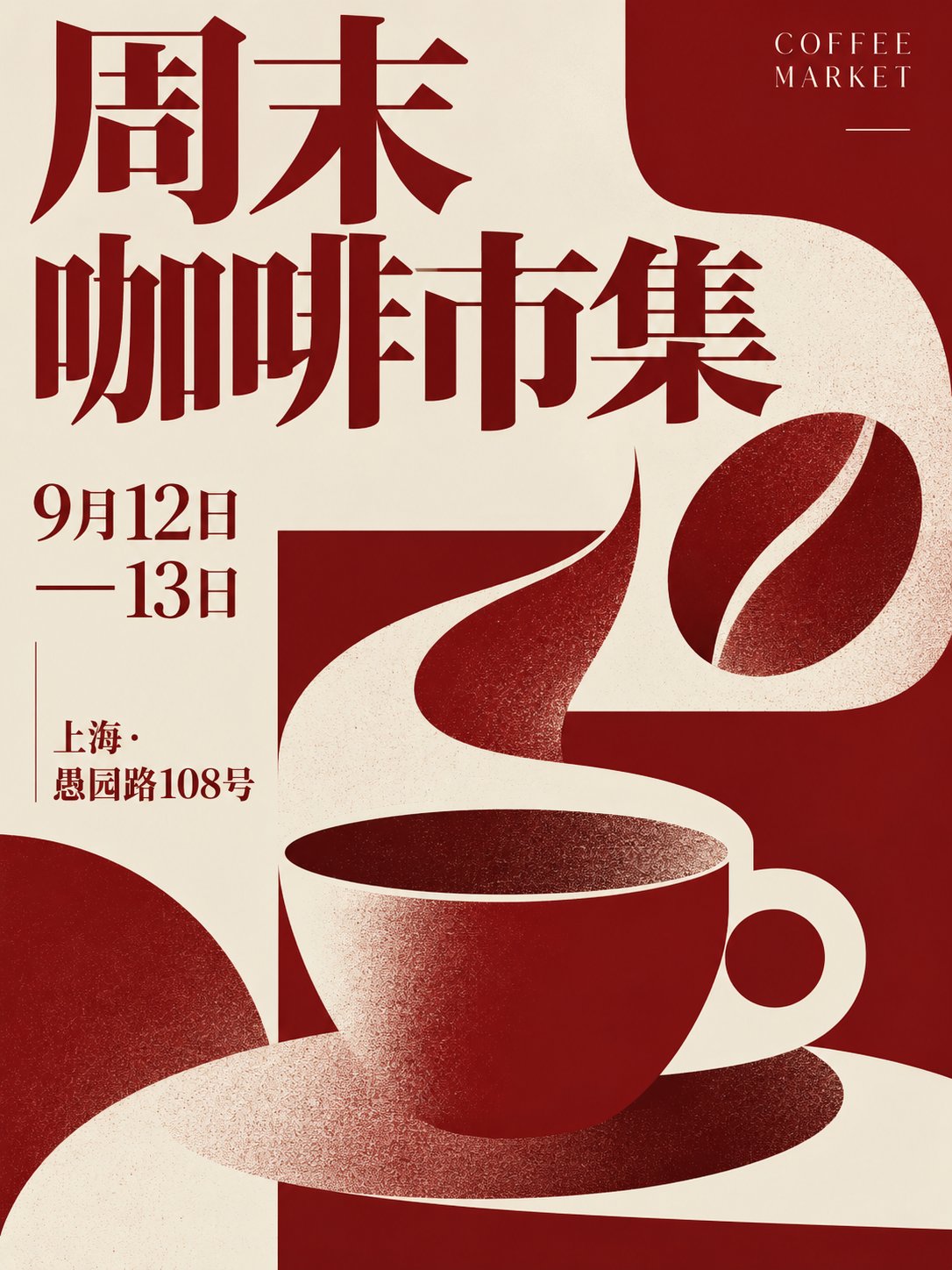
主题:周末咖啡市集
日期:9月12日—13日
地点:上海·愚园路108号
主色:深红色与米白色
风格:现代杂志排版


Prompt 分享与模板沉淀
官方文档提到的 Prompt 分享藏在编辑页面里。先从图片卡片左下角点「编辑」,再点编辑页右上角的「分享」,展开菜单后选择第二项「分享提示模板」:


咖啡豆的一生流程图
只把底部数据卡片中的“水温 92°C”改成“水温 94°C”。

其他中文、数字、图标、箭头、颜色和排版全部保持不变。
08.Final Verdict
“你终于可以围绕一张还不错的第一版继续工作,不用每说一句都重新抽盲盒。”
复杂物件关系、四轮连续修改、草图转写实图、中文信息图改单字、透明 PNG 导出和 Poster 模板,这次都给出了可用结果。草图能控制主要物体的位置,但会主动补充场景细节;信息图可以保住文字与版式关系,未指定区域仍会重新绘制;透明通道和边缘检查均通过;Poster 模板把尺寸、构图、主视觉和常用设计风格都做成了可选项,成片完成度很高。

GPT-Image 2.5 交互式实战演练台
基于上文全部实测结论,为你打造 3 个可交互落地的生产级仿真工具,体验 Delta Edit 状态机、双引擎分工与海报提示词搭建。
GPT-Image 2.5 四轮连续修改模拟器
体验「以母版图为锚点,单次只改一件事」的工程化编辑流程,验证状态累加与局部保真度。
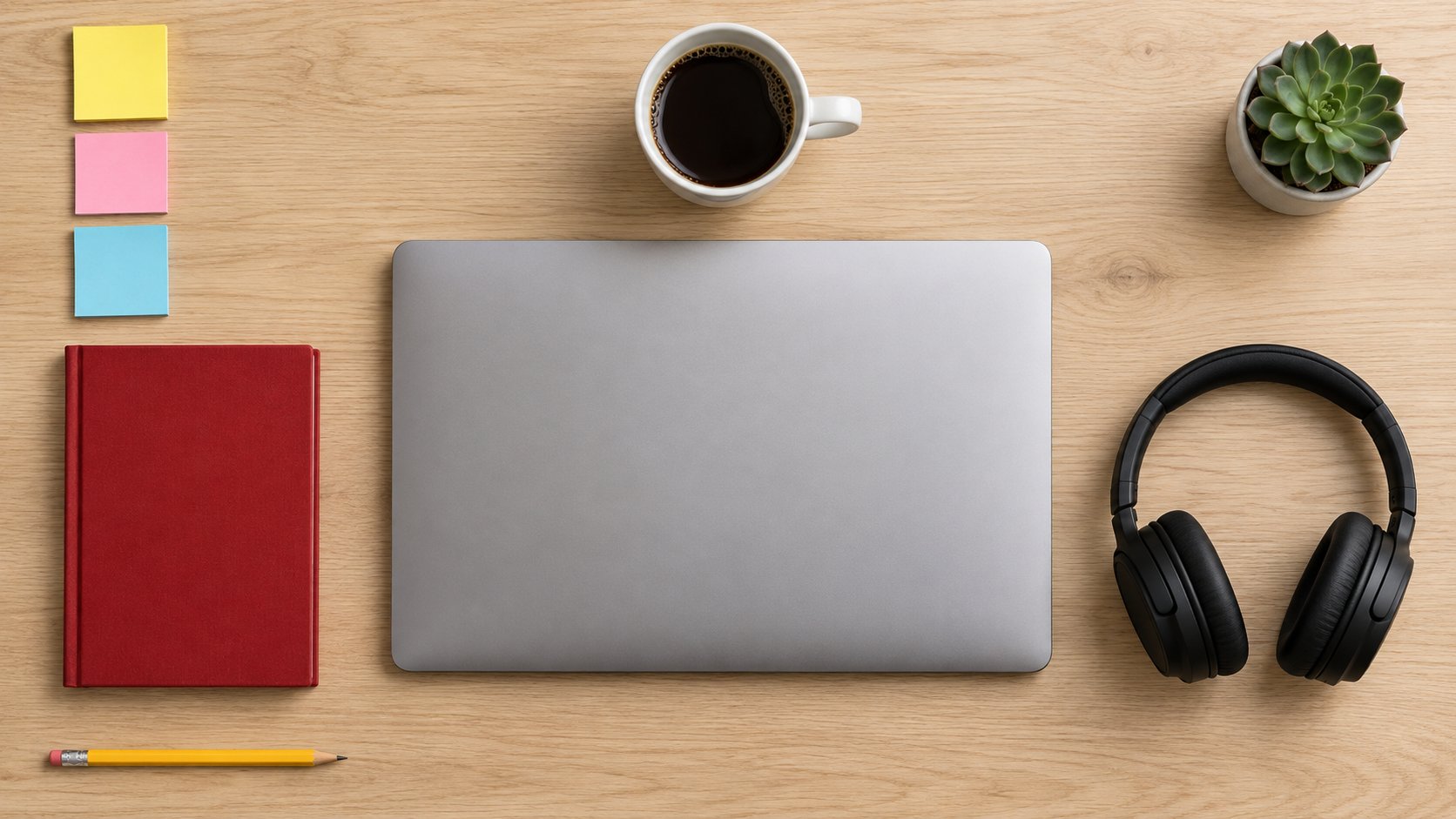
💡 实测分析:建立空间骨架与 7 组核心物件(浅色木桌、银色笔记本、白色咖啡杯、红皮笔记本、黑耳机、黄铅笔、右上多肉、左上三张便签)。后续修改全部基于此图展开。
- 浅色木桌整体纹理
- 银色笔记本电脑居中
- 白色陶瓷咖啡杯
- 红色硬壳笔记本
- 黑色头戴耳机
- 黄色铅笔
- 小型多肉植物
- 黄/粉/蓝三色便签
作为母版图生成,确立高保真坐标基准。
生成一张 16:9 写实商业摄影风格的俯拍桌面图:
- 浅色木桌
- 银色笔记本电脑位于画面正中央
- 白色陶瓷咖啡杯位于电脑上方
- 红色硬壳笔记本位于左侧
- 黑色头戴耳机位于右侧
- 黄色铅笔位于左下角
- 小型多肉植物位于右上角
- 左上角放三张竖排便签,颜色从上到下依次为黄色、粉色、蓝色

不要添加其他物品,不要出现文字。这是后续连续修改的基准图,请保持物件、构图、光线和视角稳定。
Flare vs Sunburst 工业级选型指南
两款模型 Token 单价相同,核心差异在「50% 延迟削减」与「极致微调精度」。点击场景查看最优流水线。
社媒配图重在发帖时效与多样性试错,Flare 延迟减半,能快速生成多张候选图供团队挑选。
# 场景:社媒快速配图(极速低延迟)
import openai

response = openai.images.generate(
    model="gpt-image-2.5-flare",
    prompt="A modern aesthetic flat-lay of morning coffee with magazine, sunlight shadow, 16:9, editorial",
    size="1536x1024",
    quality="standard",
    n=1
)
print(response.data[0].url)Poster 模板交互式工作台
模拟 2.5 官方 Poster 模版问答引导,快速配装高水准商业海报 Prompt。
生成一张 3:4 竖版 现代平面海报:
- 主题:周末咖啡市集
- 日期:9月12日—13日
- 地点:上海·愚园路108号
- 构图风格:现代编辑分栏,保持文字层级分明与视觉平衡
- 整体色彩:深红色与米白色高对比搭配
- 艺术流派:现代杂志排版
- 细节要求:主视觉居中或符合分栏网格,文案字形清晰无乱码,保留适当呼吸留白,不添加多余无关文字。